Table of Content


The AI Your Network Can't See: Getting Control of Local AI Models on Employee Laptops
-
November 16, 2026
-
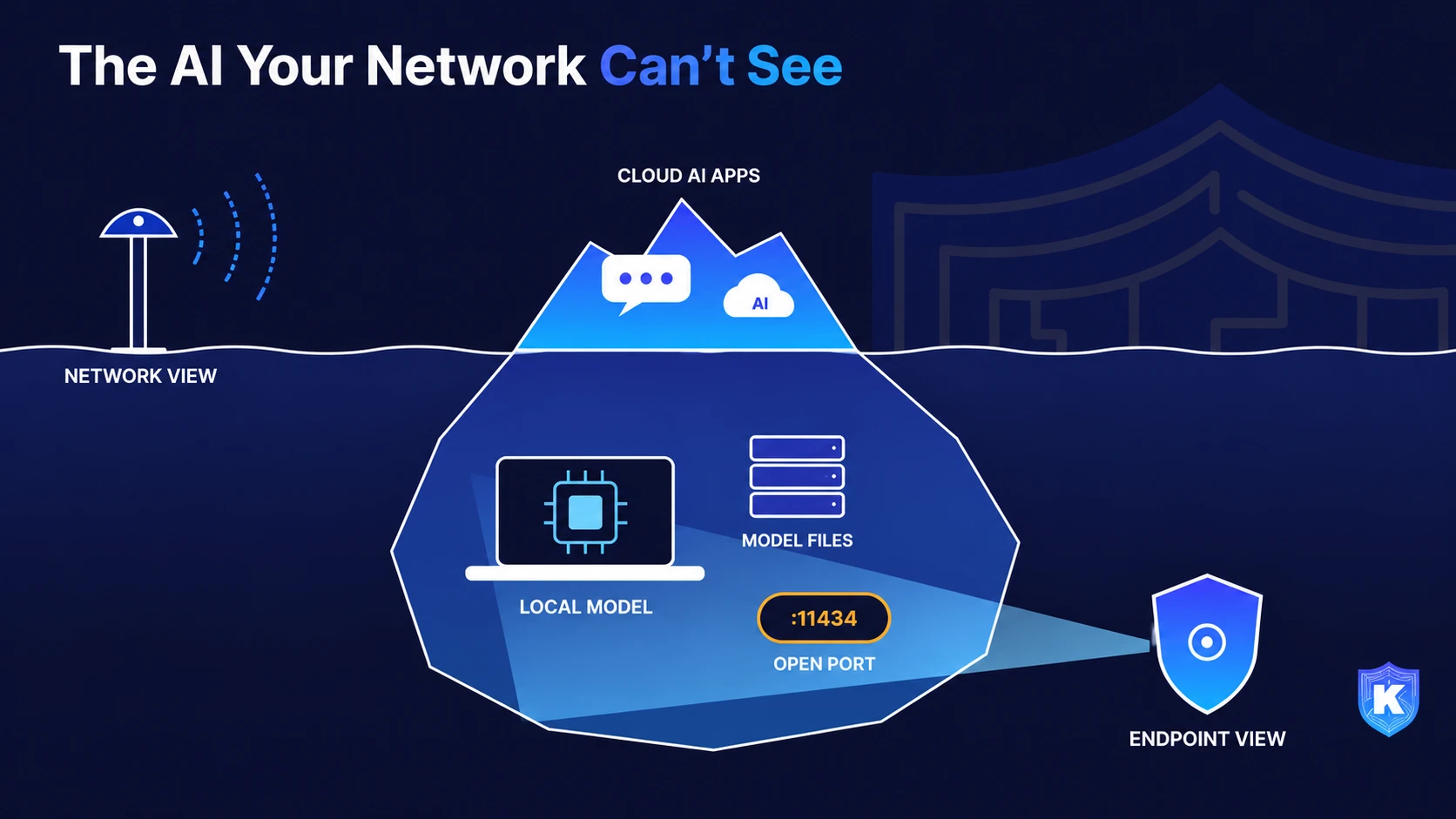
Employees can now run capable AI models entirely on their own laptops, where network and cloud security tools never see them. Here is what that means for your data, and how a lean team can find local AI, judge its risk and keep sensitive information protected without banning it.
A real-world scenario
A 600-person regional insurance broker has a clear AI policy: use the approved enterprise assistant, nothing else. A senior claims analyst wants something faster for summarizing long claim files. He installs a free local model runner on his new laptop and downloads an open-weight model. Nothing leaves the machine, so it feels like the safe choice.
To reach the model from his tablet at home, he follows a forum tip and sets it to listen on every network interface. A developer on the same floor learns the trick and points her coding assistant at a similar local model, with permission to run shell commands.
Six months later, nobody in IT knows either model exists. The web proxy logged nothing, because no traffic went out. The claim files, medical notes and API keys those models touched were never classified, and one of the runtimes is two versions behind a critical patch. There was no alert, because there was nothing on the network to alert on.
The problem: AI that runs where your controls don't look
Local AI means a model runner and model files installed on an endpoint, answering requests on the device itself. The privacy pitch is real: no vendor sees the prompt. But the organization doesn’t see it either. That is the gap.
The risk shows up in three ways.
- Exposed AI servers. Local runners are meant to listen only on the device, but one setting changes that. A SANS Institute analysis cites a SentinelLABS and Censys study that found 175,108 Ollama hosts reachable from the internet, and more than 48% of them advertised tool-calling capabilities. The same post notes the local API does not require authentication by default.
- Unpatched software holding sensitive memory. In May 2026, researchers disclosed CVE-2026-7482, nicknamed "Bleeding Llama." According to CSO Online , it can leak prompts, conversation history, API keys and customer data processed by the model to an unauthenticated attacker. The fix shipped in version 0.17.1, but only devices someone knows about get patched.
- Attackers are already looking. The Cloud Security Alliance reports that 31% of queried Ollama servers answered unauthenticated test prompts, and that honeypots recorded 91,403 attack sessions against exposed AI endpoints between October 2025 and January 2026.
The people involved are rarely careless. They are usually your most capable staff: analysts, engineers and researchers who want speed. The UK’s National Cyber Security Centre cites a study in which 71% of employees reported using AI tools their employer had not approved. The 2026 Verizon DBIR found 45% of employees are now regular AI users on corporate systems, up from 15% a year earlier.
The cost is not only a breach. It is regulated data processed with no record, secrets sitting in an unpatched process, and an auditor’s question you can’t answer: which AI systems touched customer data last quarter?
How Gen AI changed it
A few years ago, running a useful model on a laptop was a hobby. Now it takes one installer and a recent machine. Four shifts made local AI a security topic.
- The models got good enough. Open-weight models now handle summarizing, drafting and coding well. Forrester predicts that one in five large, regulated enterprises in Asia Pacific will approve Chinese open-weight models in 2027, a sign that self-hosted models are moving from side projects to policy decisions.
- Local models plug into agents. Many local runners expose the same style of API as cloud AI services. A coding assistant or desktop agent can be pointed at the laptop's own model and keep its access to files, the shell and connected tools, with no provider-side logging.
- Shadow AI multiplied. Forrester also expects one in three large Asia Pacific enterprises to find at least 10 employee-built shadow AI agents for every sanctioned one. Local models make those agents cheaper to build and harder to see.
- Attackers move faster. Exposed AI services are now scanned and probed at scale, as the honeypot data above shows. A runtime left open on a hotel or home network can be found quickly.
Why legacy approaches fall short
Most shadow AI programs were built to watch traffic leaving the building. Local AI doesn’t leave.
- Network-only and cloud-proxy inspection sees DNS lookups, TLS sessions and SaaS logins. A model answering on the laptop's loopback address produces none of them. The proxy isn't failing; it is looking at a boundary the data never crosses.
- URL and app-category filters can block a download site, but not a model file copied from a USB drive or pulled through a package manager.
- Regex and pattern DLP can flag a card number in an upload, but has no event to inspect when a claim file is read by a local process. It also struggles with the unstructured text these models are best at: notes, contracts and chat logs.
- Block-everything policies push the behavior underground. People who need the speed will find a way, and you lose the chance to steer them to a safe setup.
- Heavy tool stacks that need a dedicated analyst to tune are out of reach for most teams of two to five people. Adding another console for AI just moves the blind spot.
What a modern approach looks like
The goal is not to ban local AI. As the NCSC puts it, “You cannot manage what you do not know,” and shadow AI is unlikely to disappear, so the aim is to reduce risk. Five principles get you there.
- 1.Look where the AI runs. Inventory AI on the endpoint itself: runtimes, desktop apps, command-line tools, agents and their versions. This is the only place local AI leaves evidence.
- 2.Judge by what it can do, not by its name.A model that only answers questions is different from one wired to an agent that runs code, reaches the network or acts without approval. Rank by capability and exposure.
- 3.Treat AI runtimes like any other software.Track versions, map known CVEs and patch on a schedule. The Cloud Security Alliance recommends binding these services to localhost, requiring authentication and setting patch deadlines by CVE severity.
- 4.Protect the data, whatever the destination. Classify sensitive data on the device and apply controls when people copy, paste, upload or move it, so protection doesn't depend on which AI tool is in use.
- 5.Offer an approved path. Sanction a vetted local setup for the teams that need one. People choose the safe route when it is also the easy route.
How Kitecyber helps
Kitecyber is an endpoint-first platform: one lightweight agent and one console. Because it runs on the device, it sees AI that never touches the network.
- Find local AI. Shadow AI discovery inventories every AI app and agent reachable from the device, including desktop apps and command-line tools. The Gen AI Agents view lists agents found across endpoints, such as Ollama, with user counts, device counts and installed versions.
- Know what's out of date. A per-agent drill-down shows which devices and users have it installed, the version and known CVEs, across macOS, Windows and mobile.
- Rank by real risk. The AI Agent Security posture view gives each device and agent a High, Medium or Low rating with a plain-language reason. A capability matrix shows whether an agent runs code, sends data out, holds secrets or admin access, or acts without approval. MCP servers, connectors, configs and running processes are risk-scored, with network reach and autonomy among the permission categories. Blind spots and prioritized recommendations tell you what to fix first.
- Protect the data itself. Data Shield discovers and classifies sensitive data at rest on endpoints across 80+ categories, including PII, PHI, PCI and source code. It can allow, warn or block copy/paste, uploads, USB and cloud storage transfers at the moment of action, and policies keep working offline.
What day one looks like: the agent deploys in about a day with pre-built compliance policies and under 2% CPU overhead. As endpoints check in, the AI inventory fills in. Week one is review: confirm which local runtimes exist, patch the ones with known CVEs, sanction an approved setup, and turn on warn-mode policies for regulated data before moving to block.
SME decision-maker checklist
Quick wins for this week, and questions to put to any vendor:
- Ask IT for a list of AI runtimes, desktop AI apps and coding agents installed on company laptops. If nobody can produce it in a day, that is your first gap.
- Check whether any local AI service on your network is listening beyond the device itself, and confirm every runtime is patched for CVE-2026-7482.
- Add AI runtimes to your software inventory and patch policy, with deadlines tied to CVE severity.
- Ask vendors: can your tool see AI that never sends network traffic? Show me on a laptop running a local model.
- Ask vendors: can you rank agents by what they can do (run code, reach the network, act without approval), not just list them?
- Ask vendors: does data protection depend on knowing the AI destination in advance, or does it classify and act on the device?
- Publish an approved local AI setup so teams that need one have a safe default.
Compliance angle
Most frameworks don’t mention local AI by name, but they all expect you to know what software touches regulated data.
- SOC 2: controls to prevent or detect unauthorized software, and logical access over systems that process customer data. An unknown model runner holding customer records is a finding waiting to happen.
- ISO 27001:2022: asset inventory and rules on installing software apply to AI runtimes and model files like any other software.
- HIPAA: the Security Rule's risk analysis has to cover every system that creates, receives or maintains PHI, including a local model summarizing patient notes.
- PCI DSS v4.0: an inventory of in-scope system components, plus secure configuration and timely patching.
- GDPR: records of processing and appropriate security under Article 32. Processing personal data in an unlogged AI tool makes both hard to show.
- EU AI Act: AI literacy duties for organizations that deploy AI have applied since February 2025. Knowing which AI your staff use is the starting point.
- CMMC and NIST SP 800-171: configuration management and software restrictions on systems that handle controlled unclassified information.
Kitecyber’s pre-built policies and mapped controls cover GDPR, SOC 2, HIPAA, PCI DSS, ISO 27001, FINRA, CMMC, NIST 800-53 and CIS, which helps turn the inventory into audit evidence.
Key takeaways
- Local AI is invisible to tools that only watch network traffic. The evidence lives on the endpoint, so that is where to look.
- The biggest risks are practical: runtimes exposed beyond the device, unpatched versions holding sensitive data in memory, and agents with more power than anyone approved.
- Inventory, rank by capability, patch, and protect the data on the device. Then give people an approved path so they don't need a shadow one.
See it on your own endpoints. Schedule a walkthrough at kitecyber.com and find out what AI is running on your laptops today.

Ajay Gulati
Ajay Gulati is a passionate entrepreneur focused on bringing innovative products to market that solve real-world problems with high impact. He is highly skilled in building and leading effective software development teams, driving success through strong leadership and technical expertise. With deep knowledge across multiple domains, including virtualization, networking, storage, cloud environments, and on-premises systems, he excels in product development and troubleshooting. His experience spans global development environments, working across multiple geographies. As the co-founder of Kitecyber, he is dedicated to advancing AI-driven security solutions.