Table of Content


Personal Laptops, Contractor Devices, Company Data: Securing Work on Devices You Don't Own
-
November 18, 2026
-
A real-world scenario
A 900-person medical billing company brings in 35 contractors for a three-month system migration. Shipping laptops would take weeks, so the team gives them VPN accounts and lets them work from their own machines. Several full-time staff already check email and shared drives from personal laptops on weekends.
One contractor’s home PC is also the family computer. A game mod downloaded by a teenager carries an infostealer. It quietly collects saved passwords and browser session cookies, including the contractor’s VPN login and a live session to the billing system.
Two weeks later, an unfamiliar login pulls a large export of patient billing records. The VPN log shows a valid user with a valid password. Nobody can say what was on that device, what else it copied, or whether the contractor’s personal AI assistant was also fed customer data along the way. When the project ends, nobody is sure every copy of the data is gone.
The problem: your data lives on devices you don't control
- Unmanaged devices leak work logins. In infostealer data analyzed for the 2025 Verizon DBIR, 46% of compromised systems that held corporate logins were non-managed devices hosting both personal and business credentials, as Help Net Security reported.
- Third parties are now half the story. The 2026 Verizon DBIR found that 48% of breaches involved a third party, up from 30% the year before.
- This is not a new category of user. NIST's SP 800-46 Rev. 2 guide on telework, remote access and BYOD already names employees, contractors, business partners and vendors as remote users, and says organization-issued and personally owned devices both need protection.
How Gen AI changed it
- Personal AI accounts are the norm. Even on company devices, the 2026 Verizon DBIR found 67% of users reach AI services through non-corporate accounts, according to eSecurity Planet. On a personal laptop, you have no view at all.
- Paste is the new upload. TechTarget's DBIR summary reports that shadow AI was the third most common non-malicious insider risk in the report's DLP data, up 400% from 2024. A contractor can paste a customer list into a personal chatbot without a single file leaving a share.
- Personal agents arrive at work. Forrester predicts in its 2027 Asia Pacific predictions that an employee's personal AI agent will trigger an incident at a Fortune 500 company, as consumer agents gain access to corporate devices, credentials and data. Controls that only check identity and access can't see what the agent intends to do.
- Reshaped data slips past simple rules. Summaries, screenshots and rewritten text carry the same sensitive content without matching the original file.
Why legacy approaches fall short
- Traditional VPNs put a remote device on the network, often with reach far beyond the one app a contractor needs. A stolen VPN password becomes a stolen network.
- Network-only and cloud-proxy inspection depends on steering traffic through a gateway. Split tunnels, policy exceptions and personal devices with no client installed fall outside it, and it can't see copy/paste, USB or local apps.
- Browser-only controls cover web sessions but miss desktop apps, file sync clients and anything that happens after a download.
- Full device management on personal laptops asks people to hand their own machine to IT. Many refuse, and privacy laws may back them.
- "No BYOD, ever" policies sound safe, but shipping and imaging laptops for short contracts is slow and costly. The work happens on personal devices anyway, just without controls.
- Regex and pattern DLP misses data that has been summarized, screenshotted or rewritten.
What a modern approach looks like
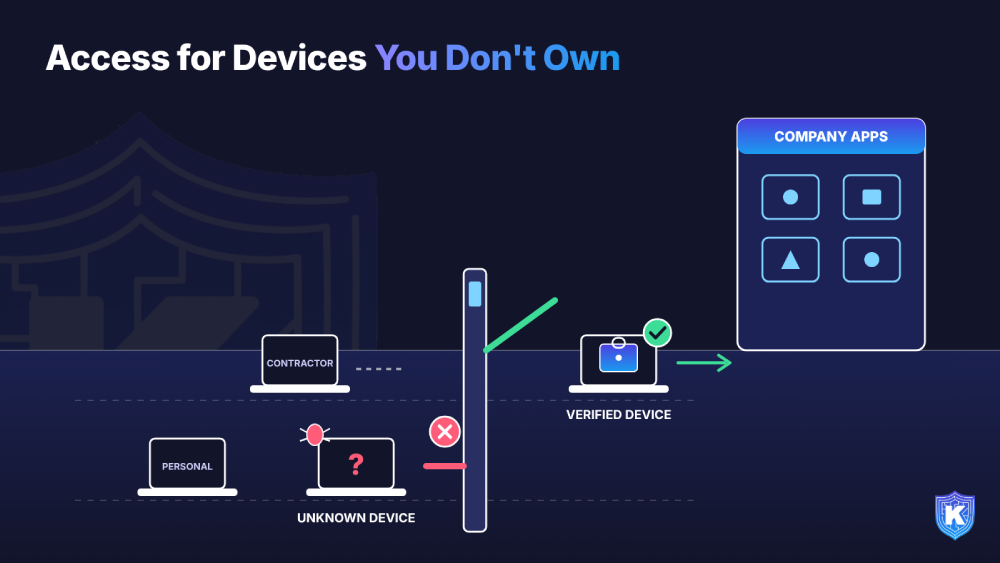
- 1. Check the device before granting access. Every connection should present device posture, not just a password. A valid login from an unknown device is not the same as one from a known, healthy laptop.
- 2. Give access to apps, not networks. Zero-trust access connects a contractor to the two applications they need and nothing else, so a stolen login has a small blast radius.
- 3. Separate work from personal. Keep corporate data in a managed container on personal devices. IT controls the work side; the employee keeps privacy on the rest.
- 4. Let data protection travel with the device. Classify sensitive data on the endpoint and control copy/paste, uploads, USB and AI tools there, so the policy works on a home network, a hotel network or offline.
- 5. Tier your policies. Managed laptops, enrolled personal devices and contractor machines each get rules that fit their trust level, instead of one policy that is too loose for some and too strict for others.
- 6. Make offboarding a button. When a contract ends, revoke access centrally, remove corporate data from the device and keep the log of every access path for the audit.
How Kitecyber helps
- Zero-trust access instead of VPN (Infra Shield). Least-privilege access to your own apps and infrastructure, with native SSO and passwordless, device-aware authentication. It blocks unmanaged devices, helps prevent credential-based attacks, and supports B2B and third-party access while logging every access path.
- BYOD without taking over the device (Device Shield). BYOD user enrollment with containerization of corporate data, alongside zero-touch enrollment for company-owned Windows, macOS, Linux, iOS and Android devices. Remote actions such as lock and wipe come with full command tracking.
- Data protection that travels (Data Shield). Unified endpoint and network DLP for corporate and BYOD endpoints. It classifies 80+ data categories on the device and can allow, warn or block copy/paste, uploads to cloud and SaaS apps, USB and network drives, and sensitive data pasted or uploaded into ChatGPT, Claude and Gemini. Policies keep working offline.
- Identity in sync. SCIM 2.0, Okta, Microsoft Entra and SAML integrations mean onboarding and offboarding follow your identity provider.
SME decision-maker checklist
- Pull a list of every active contractor and partner account, and check which ones still have access after their project ended.
- Find out how many logins last month came from devices you don't manage. If you can't tell, that is the first gap.
- Replace network-wide VPN access for third parties with access to named applications only.
- Ask vendors: can you check device posture on a personal laptop without full device management?
- Ask vendors: does your data protection cover copy/paste, USB, desktop apps and AI tools on personal devices, or only browser sessions?
- Ask vendors: what happens to corporate data on a personal device when I offboard a contractor, and how do I prove it?
- Write a one-page BYOD and contractor standard: which devices may connect, to what, and under which controls.
Compliance Support
- HIPAA: the Security Rule's access controls, audit controls and device and media controls apply to any device that touches ePHI, and business associates must protect it too.
- PCI DSS v4.0: multi-factor authentication for access into the cardholder data environment, plus management of third-party service providers.
- SOC 2: logical access controls, including access from outside the system boundary, and monitoring of vendors and business partners.
- ISO 27001:2022: Annex A controls for remote working, user endpoint devices and supplier relationships.
- CMMC and NIST SP 800-171: control of remote access and of connections from external systems that handle controlled unclassified information.
- GDPR: appropriate security under Article 32, and processor obligations under Article 28 when contractors handle personal data.
- EU AI Act: AI literacy duties for organizations deploying AI apply to contractors acting on your behalf, which makes visibility into AI use on their devices worth having.
Key takeaways
- Contractors, partners and personal devices are where stolen logins and lost data often start. A valid password from an unknown device should not be enough.
- Give access to apps, not networks, and keep work data in a container that respects personal privacy.
- Put data protection on the device, so copy/paste, USB, uploads and AI tools are covered on any network, and make offboarding a single, provable step.

Ajay Gulati
Ajay Gulati is a passionate entrepreneur focused on bringing innovative products to market that solve real-world problems with high impact. He is highly skilled in building and leading effective software development teams, driving success through strong leadership and technical expertise. With deep knowledge across multiple domains, including virtualization, networking, storage, cloud environments, and on-premises systems, he excels in product development and troubleshooting. His experience spans global development environments, working across multiple geographies. As the co-founder of Kitecyber, he is dedicated to advancing AI-driven security solutions.