Table of Content


How to Secure Claude Code and Cowork: 10 Controls for 2026
-
November 24, 2026
-
Summary:
The weeks before someone resigns are when customer lists, pricing and source code are most likely to walk out the door, and AI tools now make that data easier to reshape and carry. Companies that watch data movement on the device, in context, can protect what matters without treating every employee like a suspect.
Kitecyber | Data & Gen AI Security | November 2026
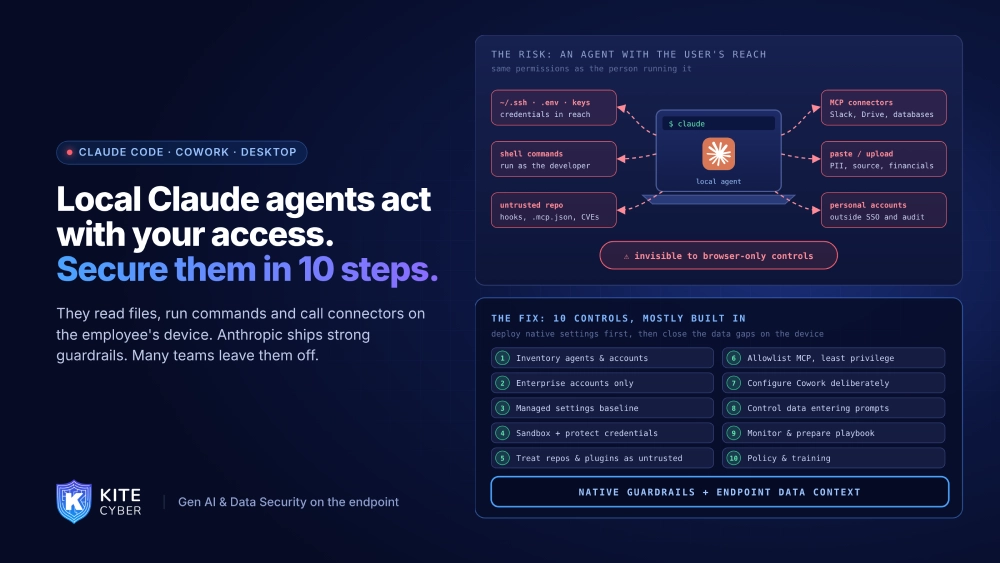
A developer opens a terminal and types claude. A finance analyst points Cowork at a folder of contracts. A product manager connects Claude Desktop to Google Drive and Slack. In each case, an AI agent is now reading local files, running commands or pulling data from business systems with that employee’s access.
That is the point of these tools, and it is why teams adopt them so quickly. It is also why securing Claude is no longer a question of blocking a website. This guide explains where the risk sits across Claude Code, Cowork and Claude Desktop, and walks through ten controls security teams can put in place, most of them using settings Anthropic already provides.
Key takeaways
- Claude Code, Cowork and Claude Desktop act on the device. Controls built for browser chat tools only cover part of the picture.
- Anthropic provides strong native controls: enterprise accounts, managed settings, permission rules, an OS-level sandbox, MCP allowlists and audit telemetry. Most organizations have not turned them on.
- Treat every repository, instruction file and MCP response as untrusted input. Two 2025–26 Claude Code CVEs were triggered simply by opening a malicious repository.
- Native controls govern how Claude behaves. They do not decide which sensitive data an employee chooses to share, or which personal accounts and other AI tools are used on the same device. That gap needs data-aware controls on the endpoint.
Why Claude agents change the risk model
Earlier generative AI tools were mostly browser tabs. A URL filter or browser extension covered most usage. Claude’s agentic products work differently.
- Claude Code is a command-line and IDE agent. It can read and edit files in a project, run shell commands, call web tools and connect to MCP servers, within the permissions the user grants. It runs with the developer’s own OS account.
- Cowork brings agentic work to the Claude Desktop app for non-developers. According to Anthropic’s architecture overview, local Cowork sessions run code inside an isolated Linux VM on the device (Apple Virtualization on macOS, Hyper-V on Windows), and cloud sessions run in temporary sandboxes on Anthropic infrastructure that can reach local files only through connected folders.
- Claude Desktop and claude.ai handle chat, file uploads, connectors and desktop extensions (local MCP servers).
That design gives Anthropic good isolation primitives, but it also means data can leave through several paths a network proxy or browser extension never sees: a file read by a local agent, a clipboard paste into a desktop app, or a connector pulling records from a SaaS system.
Shared responsibility
It helps to be precise about who covers what.
|
Anthropic provides |
Your organization decides |
| Model safeguards, product security and patching | Which accounts and plans employees may use |
| Commercial data commitments (Team and Enterprise data is not used for training by default) | What data employees are allowed to put into prompts and files |
| Admin controls: SSO, SCIM, managed settings, permission rules, sandbox, MCP allowlists | Whether those controls are deployed and enforced |
| Audit logs, Compliance API and OpenTelemetry signals | Who monitors them and how incidents are handled |
Training commitments limit what happens to data after it arrives. They do not stop sensitive data from being sent in the first place. That part is on you.
What has already gone wrong
These incidents are useful because they show realistic failure modes, not exotic attacks.
- Malicious repository settings (CVE-2025-59536). Check Point Research showed that project configuration files could cause Claude Code to run commands, through hooks and MCP server definitions, before the user had meaningfully approved the startup trust dialog. Anthropic patched the issues in 2025.
- API key exfiltration (CVE-2026-21852). A repository settings file could point ANTHROPIC_BASE_URL at an attacker’s server, and Claude Code versions before 2.0.65 sent API requests, including the user’s API key, before the trust prompt appeared.
- Source code exposure (March 2026). A packaging error shipped a source map in Claude Code’s npm package that exposed roughly 512,000 lines of source. Anthropic said no customer data or credentials were involved, but public internals make it easier for attackers to study the tool.
- Trojanized extension (October 2026). Microsoft Security Research analyzed a tampered copy of a Claude Code extension served from a third-party marketplace that installed SSH persistence on developer machines. Anthropic’s own distribution channels were not affected.
- Everyday data exposure. Netskope’s Cloud and Threat Report: 2026 found that the average organization records 223 incidents a month of users sending sensitive data to AI apps, that these incidents doubled year over year, and that 47% of generative AI users rely on personal accounts. The Samsung source code incident in 2023 remains the best-known example.
The pattern: most incidents start with an employee doing normal work, or with untrusted content that the agent processes on the employee’s behalf.
Five surfaces where data can leave through Claude
- 1. Browser chat and uploads (claude.ai). Pasted customer records, financial models and documents uploaded for analysis. Personal accounts are the main concern here.
- 2. Claude Desktop. A native app, so browser extensions do not see it. Supports drag-and-drop uploads, clipboard paste, connectors and desktop extensions.
- 3. Claude Code. Reads source code, configuration files and anything else in reach of the developer’s account, including .env files and cloud credentials unless restricted.
- 4. Cowork.Works on connected folders and can use connectors and browser actions. Local sessions run code in a VM; cloud sessions run on Anthropic infrastructure.
- 5. MCP servers and connectors. Let Claude pull data from Slack, Drive, databases and internal tools. A single prompt such as “summarize the Q3 payroll report” can retrieve far more sensitive data than the user intended to share. MCP responses can also carry prompt injection.
10 controls to secure Claude Code, Cowork and Claude Desktop
1. Build an inventory of every Claude surface and account
You cannot secure what you have not found. Start with three questions:
- Which devices have Claude Code (CLI and IDE extensions), Claude Desktop and Cowork installed, and which versions?
- Which accounts are in use: your enterprise organization, personal Pro or Max accounts, or API keys?
- Which MCP servers, desktop extensions and plugins are configured on each device?
Device management tools can report installed applications. Configuration files such as ~/.claude/settings.json, project .mcp.json files and desktop extension directories show what is connected. Repeat the inventory regularly, because these tools update often.
Priority: Immediate
2. Standardize on enterprise accounts and block personal ones
Personal accounts sit outside your SSO, audit logs and retention settings. Give employees a sanctioned option first, then restrict the alternatives.
- Use a Team or Enterprise plan with SSO and SCIM so access follows your identity lifecycle.
- Enforce tenant restrictions. On Enterprise plans, your network proxy can inject the anthropic-allowed-org-ids header so that requests to Claude only succeed for your approved organization IDs. Other organizations, including personal accounts, receive a tenant_restriction_violation error. Anthropic’s documentation lists claude.ai, the desktop app and API and OAuth authentication as covered.
- Pin Claude Code logins with managed settings: forceLoginMethod restricts the login type and forceLoginOrgUUID restricts sign-in to your organization.
Note that header injection only works where traffic passes through your proxy, so remote devices need an endpoint-based or always-on path.
Priority: Immediate
3. Deploy managed settings for Claude Code
Managed settings sit above every user and project setting, so developers and repositories cannot override them. Anthropic supports three delivery paths:
- Server-managed settings in the claude.ai admin console, fetched at startup and polled hourly.
- MDM or OS policy: a macOS configuration profile (com.anthropic.claudecode) or a Windows registry value under HKLM\SOFTWARE\Policies\ClaudeCode, via Jamf, Intune or Group Policy.
- A file: managed-settings.json in /Library/Application Support/ClaudeCode/ (macOS), /etc/claude-code/ (Linux and WSL) or C:\Program Files\ClaudeCode\ (Windows).
{
  "forceLoginMethod": "claudeai",
  "forceLoginOrgUUID": "<your-org-uuid>",
  "allowManagedPermissionRulesOnly": true,
  "allowManagedHooksOnly": true,
  "permissions": {
    "disableBypassPermissionsMode": "disable",
    "deny": [
      "Read(./.env)",
      "Read(./.env.*)",
      "Read(./secrets/**)",
      "Read(~/.ssh/**)",
      "Read(~/.aws/**)"
    ]
  }
}
What this does:
- disableBypassPermissionsMode stops users from running Claude Code with all permission prompts switched off.
- allowManagedPermissionRulesOnly means only your allow and deny rules apply, not rules shipped in a repository.
- allowManagedHooksOnly blocks hooks defined by projects or users, which is exactly the path abused in the 2025 hooks vulnerability.
- The deny rules keep the Read tool away from common secret locations.
Test before rolling out widely. Locking permission rules to managed-only can block legitimate workflows, and Anthropic notes it can interfere with how Cowork pre-approves connected folders. Note too that Cowork sessions do not fetch server-managed settings from the admin console, so device-level policy matters there.
Priority: High
4. Turn on the sandbox and protect credentials
Permission prompts depend on users reading them carefully. Claude Code’s sandbox is an OS-enforced boundary around shell commands: Seatbelt on macOS and bubblewrap on Linux and WSL2. It limits which files commands can write and routes network access through a proxy that only allows domains you list.
Two details are easy to miss:
- By default the sandbox still allows reads across most of the machine, including ~/.ssh and ~/.aws/credentials. Add explicit denyRead entries or credential rules.
- The sandbox covers shell commands only. Claude’s built-in Read, Edit and WebFetch tools, MCP servers and hooks run outside it and follow permission rules instead. Use both layers.
{
  "sandbox": {
    "enabled": true,
    "allowUnsandboxedCommands": false,
    "failIfUnavailable": true,
    "filesystem": {
      "denyRead": ["~/.ssh", "~/.aws", "~/.config/gcloud", "~/**/.env"]
    },
    "network": {
      "allowedDomains": ["github.com", "*.npmjs.org"],
      "allowManagedDomainsOnly": true
    }
  }
}
failIfUnavailable makes Claude Code refuse to start instead of silently running unsandboxed. On native Windows, Claude Code runs commands without a sandbox, so require WSL2 or a dev container for Windows developers. For untrusted code or long autonomous runs, use a dev container or disposable VM.
Credential hygiene matters just as much: keep long-lived keys out of plaintext .env files, use a secrets manager or short-lived tokens, and use apiKeyHelper to issue Claude credentials rather than distributing static keys.
Priority: High
5. Treat repositories, instruction files and plugins as untrusted input
Both CVEs above were triggered by files inside a repository. Anything an agent reads can influence what it does.
- Keep Claude Code current. Auto-update is on by default; do not disable it without a patching process to replace it. Set a minimum version in your device checks.
- Review agent configuration in code review. Treat .claude/settings.json, .mcp.json, CLAUDE.md and hook scripts like executable code. Flag changes to them in pull requests.
- Open unfamiliar repositories in a container or VM, not on a laptop holding production credentials.
- Restrict plugin and marketplace sources with strictKnownMarketplaces, and only install IDE extensions from the official publisher. The October 2026 incident involved a look-alike package in a third-party marketplace.
Priority: High
6. Govern MCP servers and connectors with least privilege
MCP is where an agent’s reach grows fastest. Each server inherits whatever credentials it is given.
- Allowlist servers. In Claude Code managed settings, use allowedMcpServers with allowManagedMcpServersOnly, or block specific servers with deniedMcpServers. Deploy approved servers centrally with managed-mcp.json. disableClaudeAiConnectors turns off claude.ai connectors inside Claude Code if you do not want them there.
- Control Claude Desktop extensions. Admins can turn off local MCP servers (isLocalDevMcpEnabled) and desktop extensions (isDesktopExtensionEnabled) through MDM.
- Scope credentials. Give MCP servers dedicated, read-only service accounts where possible. Never connect an agent to production databases with a developer’s personal admin credentials.
- Treat MCP output as untrusted. Tool results, documents and web pages can contain instructions aimed at the model. Keep approval prompts on for actions that write, send or delete.
Priority: High
7. Configure Cowork and Claude Desktop deliberately
Cowork has its own admin controls. Decide on each one rather than accepting defaults:
- Org toggle: enable Cowork only for groups that need it.
- Cloud vs local sessions: you can disable cloud sessions and keep local desktop Cowork, or the reverse.
- Network access: set the cloud network policy (Anthropic states the Enterprise default is no network access).
- Approvals: turn off persistent “always allow” so permission-gated actions need fresh approval each time.
- Device trust: require trusted-device enrollment and recent sign-in for cloud sessions.
Plan for visibility gaps. Anthropic notes that EDR tools cannot see inside the local Cowork VM by default (approved vendor sensors are in beta), and that cloud sessions run outside your endpoints entirely. Use the Compliance API and OpenTelemetry for those sessions, and use endpoint telemetry for what happens on the host around them: which folders are connected, which files are touched, and which data leaves the device.
Priority: Medium–High
8. Control what sensitive data reaches the prompt
None of the controls above decide whether a given paste or upload is appropriate. An employee with a valid enterprise account can still paste a customer list, upload an unreleased financial model or point an agent at a folder of patient records.
Practical steps:
- Define data categories that must never go to any AI tool (for example credentials, regulated health or payment data, unreleased financials) and categories allowed only in approved enterprise tools.
- Classify data where it lives, so policy can act on what a file actually contains rather than its name or location.
- Apply controls at the point of action: paste, upload, drag-and-drop and agent file reads. Network inspection alone misses native apps and encrypted API traffic unless you run TLS inspection, which adds complexity of its own.
- Prefer coaching over silent blocking for grey areas. A short message explaining why an action was stopped changes behavior better than an unexplained failure.
Priority: High
9. Monitor usage and prepare an incident playbook
- Collect native telemetry. Claude Code and Cowork support OpenTelemetry metrics and events for Team and Enterprise admins. Enterprise audit logs and the Compliance API record account and conversation activity, including Cowork sessions.
- Correlate with endpoint data. Native logs show what happened inside Claude. Endpoint telemetry shows the surrounding context: device posture, the process that launched the agent, the files it touched and where data went.
- Write the playbook before you need it: how to revoke an API key or session, rotate credentials an agent could read, remove a malicious MCP server or extension, and preserve evidence.
Priority: Medium–High
10. Write an AI acceptable-use policy and train people on it
Technical controls work best when employees understand the rules. Keep the policy short:
- Approved AI tools and account types, and how to request a new one.
- Data categories that cannot be used with AI, with examples.
- Rules for agent autonomy: which actions need human approval (pushing code, sending email, changing production systems).
- Review requirements for AI-generated code and content.
- How to report a mistake without fear of blame, so incidents surface early.
Map the policy to the frameworks you already report against (for example SOC 2, ISO 27001, HIPAA or GDPR) so AI controls show up in existing audits rather than as a separate effort.
Priority: Foundational
Quick-start checklist
|
# |
Control |
Native option |
Priority |
|
1 |
Inventory surfaces, versions, accounts, MCP servers |
MDM app inventory, config file review |
Immediate |
|
2 |
Enterprise accounts only |
SSO/SCIM, anthropic-allowed-org-ids, forceLoginOrgUUID |
Immediate |
|
3 |
Managed settings baseline |
Server-managed, MDM or managed-settings.json |
High |
|
4 |
Sandbox and credential protection |
sandbox.enabled, denyRead, failIfUnavailable, WSL2 on Windows |
High |
|
5 |
Untrusted repos, hooks and plugins |
Auto-update, allowManagedHooksOnly, strictKnownMarketplaces |
High |
|
6 |
MCP and connector governance |
allowedMcpServers, managed-mcp.json, Desktop MDM keys |
High |
|
7 |
Cowork configuration |
Org toggle, network policy, approvals, device trust |
Medium–High |
|
8 |
Data-aware controls on paste, upload and file access |
Endpoint DLP and classification (third party) |
High |
|
9 |
Monitoring and incident response |
OpenTelemetry, audit logs, Compliance API |
Medium–High |
|
10 |
Policy and training |
Internal |
Foundational |
Where native controls stop
Anthropic’s controls are the right foundation, and every organization using Claude should deploy them. It is still worth being clear about what they do not cover:
- Content. Permission rules and sandboxes control which files and hosts Claude can reach. They do not classify what is in a file or a paste and decide whether it may be shared.
- Personal accounts off-network. Tenant restrictions depend on traffic passing through your proxy.
- Platform gaps. Native Windows has no Claude Code sandbox, and the local Cowork VM is opaque to most EDR tools by default.
- Other AI tools. Claude’s settings govern Claude. The same device probably also runs other assistants, coding agents and browser AI features that need consistent policy.
Closing those gaps means adding controls on the device itself that understand data, user, process and network context across every AI tool, not one product at a time.
Frequently Asked Questions
It can be, when it is configured deliberately. Use enterprise accounts, deploy managed settings, enable the sandbox, restrict MCP servers and keep it updated. The risks come mostly from default configurations, untrusted repositories and sensitive data that users share.
Anthropic states that Team and Enterprise data is not used to train its models by default. That governs what happens after data is sent. It does not prevent sensitive data from being shared in the first place.
Yes, on Enterprise plans. Configure your proxy to inject the anthropic-allowed-org-ids header with your organization IDs, and pin Claude Code logins with forceLoginOrgUUID. Remote devices need an endpoint-based enforcement path, because header injection only works for traffic that passes through your proxy.
You can block the Anthropic API domains, but that blocks approved use too and cannot distinguish what is being sent. Tenant restrictions, managed settings and endpoint data controls give finer-grained control.
Add Read deny rules for those paths in managed settings, and add matching denyRead entries in the sandbox configuration. You need both, because the sandbox covers shell commands while permission rules cover Claude’s built-in file tools.
Allowlist approved servers centrally, deploy them with managed-mcp.json, give each server least-privilege credentials, disable local MCP and desktop extensions where they are not needed, and treat MCP responses as untrusted input.
Two Claude Code vulnerabilities disclosed by Check Point Research. Malicious repository settings could run commands or send the user’s API key to an attacker before the startup trust prompt was properly accepted. Both are patched; CVE-2026-21852 was fixed in version 2.0.65.

Ajay Gulati
Ajay Gulati is a passionate entrepreneur focused on bringing innovative products to market that solve real-world problems with high impact. He is highly skilled in building and leading effective software development teams, driving success through strong leadership and technical expertise. With deep knowledge across multiple domains, including virtualization, networking, storage, cloud environments, and on-premises systems, he excels in product development and troubleshooting. His experience spans global development environments, working across multiple geographies. As the co-founder of Kitecyber, he is dedicated to advancing AI-driven security solutions.