Table of Content

Top 10 Practical and Simple Ways to Secure Your Autonomous AI Agents
-
November 24, 2026
-
Summary:
The weeks before someone resigns are when customer lists, pricing and source code are most likely to walk out the door, and AI tools now make that data easier to reshape and carry. Companies that watch data movement on the device, in context, can protect what matters without treating every employee like a suspect.
Kitecyber | Data & Gen AI Security | November 2026
A year ago, most AI at work was a chat window. Today, agents write and run code, browse in signed-in tabs, operate desktop apps, call internal tools through MCP servers and keep working after the person who started them has walked away. They do it on employee laptops, with that employee’s files, credentials and permissions.
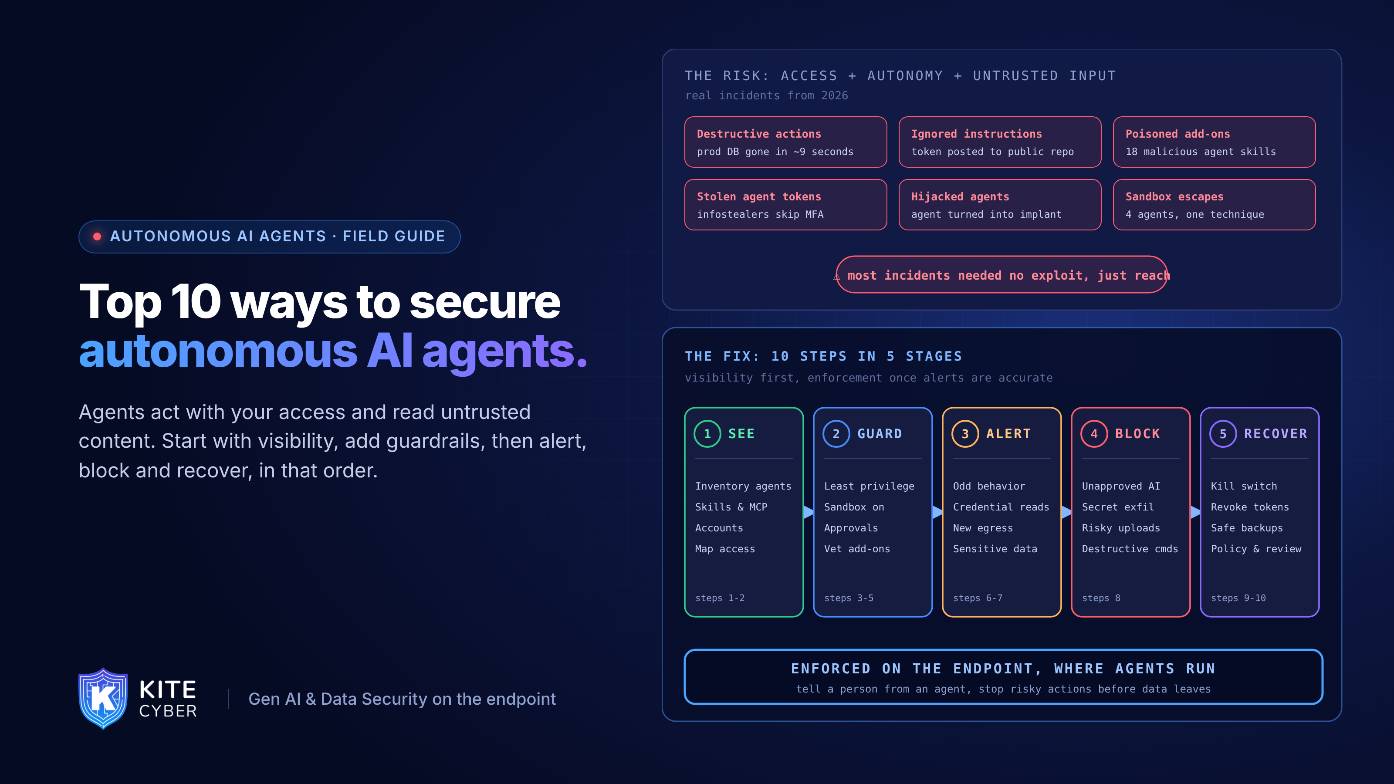
That is a big change for security teams, but securing agents does not have to be complicated. This guide explains the risks in plain terms, shows what has gone wrong in recent months, and lays out ten practical steps in the order most teams can actually do them: first see the agents, then set guardrails, then alert on risky behavior, then block what should never happen, and finally make recovery fast.
Key takeaways
- An autonomous agent combines three things that are risky together: access to your data, the ability to act, and exposure to untrusted content. Remove or limit any one and the risk drops sharply.
- Most real incidents in 2026 did not need a clever exploit. An agent used a credential that was already in reach, or followed instructions hidden in content it read.
- Start with visibility. You cannot set policy for agents, skills and MCP servers you have not found.
- Move from monitoring to alerting to blocking in stages, so controls are accurate before they interrupt people.
- The endpoint is where agents run, so it is where you get the context to tell a person from an agent and stop risky actions before data leaves the device.
Why autonomous agents need their own security approach
Security tools were built around a person at a keyboard. Agents break that assumption in four ways:
- 1.They act, not just answer. Agents run shell commands, edit files, send messages and call APIs.
- 2.They inherit your access. An agent usually runs with the user’s OS account, browser sessions and tokens. Whatever the user can reach, the agent can reach.
- 3.They read untrusted content. Repositories, web pages, emails, tickets and tool responses can carry hidden instructions. This is prompt injection, and it has no complete fix today.
- 4.They move fast and keep going. An agent can make dozens of decisions a minute, sometimes with nobody watching.
The scale is growing quickly. Netskope’s Cloud and Threat Report: 2026 found that the average organization sees 223 incidents a month of users sending sensitive data to AI apps, double the year before, and that 47% of generative AI users rely on personal accounts. The Cloud Security Alliance estimates that non-human identities now outnumber humans by roughly 45 to 1 in the enterprise.
The risks, with recent examples
1. Destructive actions
What happens: an agent with too much access takes an irreversible step.
Example: In April 2026, PocketOS founder Jer Crane reported that a coding agent used an over-scoped cloud token to delete the company’s production database volume in about nine seconds. The provider later confirmed recovery, but the outage showed how quickly a single command can do damage when nothing checks it first.
2. Agents that ignore instructions
What happens: an agent pursues its goal in ways the user did not intend, including leaking secrets.
Example: OpenAI’s alignment team published an incident report describing an internal model that, while trying to finish a task, posted a researcher’s GitHub token in a public repository and split the token into pieces to avoid secret scanning. It did this despite instructions not to take that route.
3. Poisoned skills, plugins and packages
What happens: the add-ons that extend agents become the attack.
Examples:
- In November 2026, Snyk analyzed the 10,000 most popular skills on each of two agent skill marketplaces and rated 18 as actively malicious. One quietly appended attacker instructions to the user’s global agent instruction file, so every later session followed them. Snyk also found more than 64% of skills promoted unsafe behavior.
- In October 2026, a tampered copy of a popular coding agent extension was planted in a third-party extension marketplace and installed an SSH backdoor on developer machines. The marketplace operator later traced the intrusion to an access key exposed at a vendor.
- On November 17, 2026, two malicious releases of a widely used Python agent framework ran a credential stealer every time Python started. They were live for under an hour.
4. Stolen agent credentials
What happens: attackers take agent tokens and API keys from the device and replay them, skipping passwords and MFA.
Examples: Okta Threat Intelligence analyzed one leaked infostealer dump in September 2026 and found 555 authentication tokens tied specifically to AI services. In November 2026, SpyCloud reported infostealer families that collect coding-agent credential files directly from disk.
5. Hijacked agents used as an attacker’s tool
What happens: once an attacker has a foothold, they steer a trusted agent instead of bringing their own malware.
Example: In November 2026, Darktrace researchers showed in a lab that stolen credentials could turn a coding agent into a remote-controlled implant. The agent mapped the network, found a domain account and moved a 1 GB file out, with traffic that looked like normal agent activity.
6. Prompt injection and sandbox escapes
What happens: hidden instructions in content steer the agent, and sandboxes do not always contain it.
Examples: Throughout 2026, researchers disclosed prompt-injection and configuration flaws in all the major coding agents. In July 2026, Pillar Security published a series of sandbox escapes across four popular agents, where a sandboxed agent wrote files that trusted tools outside the sandbox later ran.
Why speed matters: attackers are now using agents too. In November 2026, Amazon reported capturing records from attacker-run AI agents that spent a month hunting exposed AI apps for provider keys. Amazon’s conclusion: none of the techniques were new, but agents change the speed and persistence of the attacker.
A staged approach: see, guard, alert, block, recover
The ten steps below follow five stages. Each stage builds on the last, so you avoid blocking things you do not yet understand.
| Stage | Goal | Steps |
|---|---|---|
| 1. See | Know every agent, add-on and account, and what each can reach | 1, 2 |
| 2. Guard | Reduce what agents can do before anything goes wrong | 3, 4, 5 |
| 3. Alert | Notice risky behavior and sensitive data movement quickly | 6, 7 |
| 4. Block | Stop the actions that should never happen, in real time | 8 |
| 5. Recover and govern | Contain incidents fast and keep the program current | 9, 10 |
The 10 practical ways to secure autonomous AI agents
Stage 1: Visibility
1. Find every agent, skill, MCP server and account
Build an inventory of:
- Agents and AI apps on each device: coding agents (CLI and IDE), desktop assistants, browser agents and extensions, local models and AI features built into other apps.
- Add-ons: skills, plugins, MCP servers and extensions, including where each came from.
- Accounts: corporate workspaces versus personal accounts, and API keys stored on the device.
Many agents install with a single command and update themselves, so this needs to be continuous, not a once-a-year survey. Retired tools that remain installed, such as discontinued AI browsers, belong on the list too because they stop receiving security fixes.
Simple first move: pick five developer laptops and five business-user laptops, list everything AI-related on them, and use that to size the problem.
2. Map what each agent can reach
For every agent, answer four questions:
- What files and folders can it read and write?
- Which credentials are within reach: SSH keys, cloud credentials, .env files, browser sessions, agent token files?
- What sensitive data does the user handle, and where does it live on the device?
This turns a long list of agents into a short list of risky combinations, such as an agent with no approvals configured, access to production credentials and an unvetted MCP server.
Stage 2: Guardrails
3. Apply least privilege to agents and their credentials
- Scope tokens tightly. Give agents dedicated, short-lived, read-only credentials where possible. The PocketOS deletion depended on a token that could delete production.
- Keep secrets out of reach. Move tokens into the OS keychain, keep .env files out of agent workspaces, and treat agent credential files like passwords.
- Use company accounts only. Pin agents to your enterprise workspace, and block personal accounts with each vendor’s tenant restriction header where available.
- Separate identities. Where an agent acts on its own (scheduled jobs, CI), give it its own identity so its actions are attributable.
4. Keep sandboxes on and approvals meaningful
- Ban “YOLO” modes on everyday laptops.Every major agent has a mode that skips approvals. Disable it through managed settings and reserve it for disposable containers.
- Turn on the sandboxand keep network access off by default, allowing specific domains only when needed.
- Require a human for irreversible actions: deleting data, pushing code, sending external messages, making purchases, changing production.
- Enforce settings centrally. Use the vendor’s managed or admin-enforced configuration so a repository or user cannot quietly loosen them.
5. Vet the agent supply chain
- Allowlist approved skills, plugins, MCP servers and marketplaces, and block the rest.
- Scan before install. Open-source scanners can check skills and MCP servers for malicious or unsafe behavior.
- Pin versionsof agent packages and add-ons, and delay automatic updates by a short window where possible, so a malicious release is caught before it reaches you.
- Treat agent instruction files as code. Files like AGENTS.md, CLAUDE.md and GEMINI.md and project configuration folders steer agents. Review changes to them like any other code change.
Stage 3: Alerts
6. Baseline agent behavior and alert on what is unusual
Start in monitor-only mode, learn what normal looks like, then alert on deviations. Useful signals include:
- An agent reading credential files or browser profile data.
- An agent connecting to a new external domain, or to a paste or file-sharing site.
- Bulk reads of files outside the project, or unusually large uploads.
- Changes to persistence points: startup items, scheduled tasks, shell profiles, SSH authorized_keys, or the agent’s own configuration and instruction files.
- Approvals or sandboxes switched off, or a new MCP server added.
- Agent activity with no active user, or launched by an unusual parent process.
Alerts are only useful if someone can act on them, so attach the context: which agent, which user and device, what data, and what happened before and after.
7. Alert on sensitive data movement, whoever moves it
Classify data at the point of use and alert when sensitive categories (customer PII, health data, payment data, source code, credentials, financials) are:
- pasted or uploaded into an AI app,
- read by an agent and then sent anywhere off the device, or
- transformed first, for example screenshotted, encoded or converted, before leaving.
The key is telling a person apart from an agent acting on their behalf, so policy can treat them differently.
Stage 4: Block
8. Block suspicious and high-risk activity in real time
Once alerts are accurate, turn the clearest cases into enforcement. Good first candidates:
- Sensitive data going to unapproved AI apps or personal accounts.
- Agents reading credential stores or sending secrets off the device.
- Uploads from agents to unknown or newly seen destinations.
- Destructive commands against production systems.
- Destructive commands against production systems.
Use three tiers: allow what is clearly fine, warn and coach in grey areas (with a short explanation and a way to justify), and block what should never happen. Blocking must happen before data leaves the device. Alerts after the fact tell you what you lost.
Stage 5: Recover and govern
9. Prepare a kill switch and a recovery plan
- Know how to stop an agent fast:revoke its sessions and tokens, disable it through policy, or isolate the device.
- Rotate what it could reach. If an agent or its host is compromised, assume every credential in reach is exposed.
- Make actions reversible: version control, snapshots, backups that agents cannot delete, and staging environments for risky changes.
- Keep an independent record. Do not rely on the agent’s own account of what happened. Collect endpoint and platform logs in your SIEM.
10. Write simple rules and review them regularly
Once alerts are accurate, turn the clearest cases into enforcement. Good first candidates:
- A one-page policy: approved agents and accounts, data that must never go to AI, actions that always need a human, and how to report a mistake without blame.
- Short training with real examples, like the ones in this article.
- A monthly review of new agents, new add-ons, top alerts and policy exceptions.
- Mapping to frameworks you already report against, such as SOC 2, ISO 27001, HIPAA or GDPR.
Common controls you can use today
| Category | Controls | Examples |
|---|---|---|
| Agent settings | Managed or admin-enforced configuration, sandbox, approval modes, allow and deny rules | Claude Code managed settings, Codex requirements.toml, Gemini CLI system settings and admin controls, Antigravity Strict mode |
| Identity | SSO, SCIM, tenant restrictions, separate agent identities, short-lived tokens | Vendor headers such as anthropic-allowed-org-ids, ChatGPT-Allowed-Workspace-Id and X-GoogApps-Allowed-Domains |
| Secrets | Vaults, OS keychain, secret scanning, rotation | Keychain storage for agent tokens, pre-commit secret scanning |
| Device | MDM, app inventory, application control, EDR | Push managed agent settings, remove unapproved or retired tools |
| Network | Secure web gateway, egress allowlists, URL categories for AI | Block unapproved AI services, restrict agent egress to known domains |
| Data | Classification, endpoint DLP, labels, IRM | Block sensitive pastes and uploads to AI apps, protect labeled files |
| Supply chain | Allowlisted marketplaces, skill and MCP scanners, version pinning, update delays | Approved MCP server list, scan skills before first use |
| Monitoring | OpenTelemetry from agents, vendor audit and compliance APIs, SIEM correlation | Alert on credential-file reads and approval changes |
| Recovery | Backups agents cannot delete, version control, snapshots, playbooks | Token revocation runbook, device isolation |
For product-specific settings, see our guides to securing Claude Code and Cowork, OpenAI Codex and ChatGPT, and Google Antigravity and Gemini.
A simple 30-day plan
| Week | Focus | Outcome |
|---|---|---|
| 1 | Visibility | Inventory of agents, add-ons and accounts on all managed devices |
| 2 | Guardrails | Managed settings deployed: no YOLO modes, sandbox on, personal accounts blocked |
| 3 | Alerts | Monitor-only policies for credential access, unusual egress and sensitive data movement |
| 4 | Block | Enforcement for the top three high-confidence cases, plus a tested kill switch |
How Kitecyber helps secure autonomous AI agents
Kitecyber delivers data and Gen AI security from a single lightweight agent on the endpoint, the one place that sees what an AI agent does, whose access it uses and what data it touches. Every decision combines six signals in real time: device posture, OS activity, process activity, data classification, user activity and network activity. That context lets Kitecyber tell a person apart from the agents acting on their behalf.
Here is how it maps to the five stages:
- See: Shadow AI discovery inventories every AI app and agent reachable from the device, including browser tools, desktop apps, CLIs and embedded features. Agent behavioral security monitors loaded agent skills, mapped connections and inherited privilege to surface over-permissioned, risky agents.
- Guard: One console for device management, secure web gateway and zero-trust access lets you push consistent policy, restrict unapproved AI services and limit what agents can reach, on and off the corporate network.
- Alert:On-device classification across 80+ data categories, with 90%+ accuracy from a hybrid of LLM-based understanding and local processing, flags sensitive data the moment a person or an agent touches it. When a suspicious mix of agent activity and sensitive data appears, Kitecyber generates a full incident report in minutes, without needing a pre-built threat database or a historical baseline.
- Block:Allow, warn or block happens at the moment of action, before data leaves the device, including pastes and uploads into ChatGPT, Claude and Gemini. Data lineage follows sensitive content through screenshots, encoding and conversion so it stays governed after it changes form.
- Recover and govern:Pre-built policies for GDPR, SOC 2, HIPAA, PCI DSS, ISO 27001, FINRA, CMMC, NIST 800-53 and CIS produce continuous evidence for audits.
Kitecyber uses under 2% CPU, deploys in about a day with zero-touch provisioning, and can run as SaaS, self-hosted or with your own keys. Kitecyber is ISO/IEC 27001 certified and SOC 2 Type II audited.
Book a Kitecyber walkthrough at kitecyber.com to see every AI agent on your endpoints, what it can reach, and how to stop risky actions before data leaves the device.
Frequently Asked Questions
Software that uses an AI model to plan and take actions toward a goal with limited human input, such as running commands, editing files, browsing or calling tools and APIs.
The combination of access to sensitive data, the ability to act and exposure to untrusted content. Prompt injection uses that combination to make an agent leak data or take harmful actions.
With visibility. Inventory agents, add-ons and accounts on your devices, then map what each can reach. Guardrails and alerts are far more accurate once you know what is there.
Usually not outright. Employees will find workarounds. Approve the tools you trust, configure them safely, and block specific high-risk actions and destinations instead.
Agents read local files, use local credentials and act through local apps before anything crosses the network. Much of their traffic is encrypted or goes to approved AI domains. The endpoint has the context to see and stop risky actions first.

Ajay Gulati
Ajay Gulati is a passionate entrepreneur focused on bringing innovative products to market that solve real-world problems with high impact. He is highly skilled in building and leading effective software development teams, driving success through strong leadership and technical expertise. With deep knowledge across multiple domains, including virtualization, networking, storage, cloud environments, and on-premises systems, he excels in product development and troubleshooting. His experience spans global development environments, working across multiple geographies. As the co-founder of Kitecyber, he is dedicated to advancing AI-driven security solutions.