The best DLP solutions for small accounting and tax firms are endpoint-native platforms that classify sensitive files by content and context, then enforce protection at the moment a preparer, bookkeeper, or seasonal contractor tries to move a tax return, bank record, or Social Security number somewhere it shouldn’t go. Firms with 10 to 200 staff rarely have a security team watching traffic in real time. That means the tool has to make the right call on its own, at the laptop, the moment risk shows up, whether that’s an email to the wrong recipient, a client portal download landing in a personal Dropbox, or a paste into an AI chatbot during return prep.
Kitecyber built its platform around exactly this scenario: a lightweight agent that sits on the endpoint, sees where sensitive data is going across email, browser, cloud storage, removable media, and GenAI tools, and enforces policy in real time rather than flagging it after the fact. That “See, Decide, Enforce” model matters more for a 30-person tax practice than for a Fortune 500 SOC, because a small firm has no second layer of defense if the endpoint misses something.
TL;DR
About the Author: This article is written by
Kitecyber team, whose endpoint-native DLP platform protects client financial data and helps address compliance controls for regulated fintech, GenAI, and compliance-driven companies from a single lightweight agent.
What Data Do Accounting and Tax Firms Actually Need to Protect?
A tax or bookkeeping practice handles a concentrated set of high-value personal and financial data, often for hundreds or thousands of clients at once. Under IRS guidance for tax professionals, principally Publication 4557, firms are expected to safeguard all personally identifiable taxpayer data and financial information, which includes Social Security numbers, bank account details, employer identification numbers, W-2 forms, pay stubs, and complete tax returns.
That combination is what makes a small firm attractive to attackers and a serious liability exposure if mishandled. A single client file often contains everything needed for identity theft or account takeover in one document: name, SSN, address, bank routing and account numbers, and income history. A hospital keeps medical records; a bank keeps account numbers; a tax firm’s working files frequently contain both categories of sensitive data plus a full financial picture, stored in spreadsheets, PDFs, and portal downloads that move between preparers, reviewers, and clients every week during filing season.
This is why data protection for a small accounting firm cannot be treated the same as generic small business data protection. The data density per file is higher, and the number of files touched per employee per day, especially during peak season, is much higher than in most other small business categories.
Where Does Client Data Actually Leak in a Small Practice?
Building on the data types above, the more useful question for a partner or practice manager is not “could we be breached” but “where would it actually happen.” In small firms, leak paths are almost always workflow gaps rather than sophisticated intrusions.
None of these require a hacker. They require one distracted click, one convenient personal app, or one departing contractor whose laptop access was never checked. That’s precisely why sensitive
data discovery tools that only scan storage repositories after the fact miss the moment that matters: the point where a person, or increasingly a GenAI tool, is about to move the file.
What Compliance Obligations Actually Apply Here?
Given the leak paths above, the compliance question a firm partner should ask is not “are we PCI DSS certified” but “do we have the safeguards our regulator already expects.” Small accounting and tax firms must comply with the FTC Safeguards Rule under the Gramm-Leach-Bliley Act, and with IRS guidance in Publication 4557. Both call for a Written Information Security Plan (WISP) backed by administrative, technical, and physical safeguards for client data — and since the FTC’s 2023 update, the Safeguards Rule spells out specific technical expectations rather than leaving “reasonable security” undefined.
In practice, that WISP expectation is where many small firms fall short, not because they lack a document, but because the document describes controls the firm doesn’t actually have running. A WISP that says “we monitor for unauthorized data transfers” is not credible unless there is a tool actually watching for unauthorized data transfers, in real time, on the devices where those transfers happen.
This is also where PCI DSS becomes relevant for firms that process card payments for their services, and where zero trust data protection principles (verifying every access request rather than trusting a device or network by default) matter even for a firm with no on-premises server room. A firm doesn’t need enterprise infrastructure to meet these expectations. It needs enforcement that runs wherever the data actually moves, which for most small practices is a mix of laptops, email, cloud storage, and a client portal, not a data center.
What Should a Small Firm Look for in a DLP Tool?
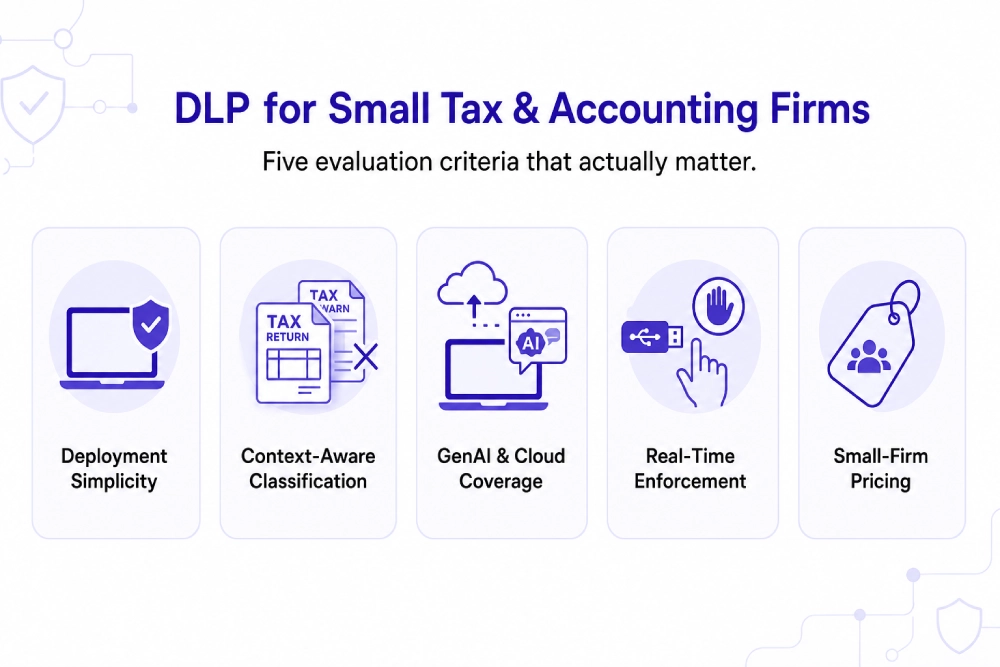
Given those obligations, the practical filter for evaluating a DLP tool is fit, not feature count. A small firm should weigh five things before signing anything:
How Do the Leading DLP Options Compare for a Small Firm?
With those criteria in mind, here is how several established options actually differ in architecture, which matters more than feature lists for a firm with no IT security staff.
|
Solution
|
Architecture
|
Best fit for a small firm
|
Honest limitation to weigh
|
|
Kitecyber
|
Endpoint-native agent covering endpoint, email, browser, cloud, removable media, and data pasted or uploaded into GenAI tools
|
Firms with no dedicated security staff needing real-time enforcement plus SOC 2/PCI-relevant controls from one agent
|
Newer entrant compared to legacy suites, so evaluate fit through a trial
|
|
Endpoint Protector (CoSoSys/Netwrix)
|
Standalone or virtual appliance with lightweight endpoint agents, Windows/macOS/Linux support
|
Firms wanting granular USB and device control alongside content-aware DLP
|
Focused mainly on endpoint-level enforcement rather than broader network inspection
|
|
Safetica
|
Cloud-native or on-premises with endpoint agents, no network appliance required
|
Mid-market firms wanting device control and workspace monitoring without appliance overhead
|
Strength is device control and activity monitoring; validate classification depth on scanned tax forms during a trial
|
|
Microsoft Purview
|
Cloud-native, built into Microsoft 365/Azure
|
Firms already fully standardized on Microsoft 365 for email and file storage
|
Built for the Microsoft ecosystem specifically, less useful if the firm runs a mixed tool stack
|
|
Nightfall
|
Cloud-native, API-first with an endpoint agent
|
Firms wanting SaaS and cloud app coverage without appliances
|
Core detection engine depends on cloud connectivity
|
For a firm evaluating these, the honest answer is that appliance-based and API-only tools each solve part of the problem. A network appliance can’t see what happens on a preparer’s home laptop. An API-only tool can’t stop a clipboard paste into a GenAI chatbot before it happens. Endpoint-native coverage, the approach Kitecyber and a few others take, closes both gaps because the agent is present wherever the data actually moves, not just where it’s stored.
Why Does Endpoint-Native DLP Matter More for Small Firms Than Enterprise Suites?
The comparison above raises an obvious follow-up: why not just buy the biggest enterprise suite and be done with it. The answer is operational, not technical. Enterprise DLP suites built around dedicated servers, appliance clusters, or centralized management consoles assume a team exists to run them. A 40-person tax firm doesn’t have a DLP administrator; it has a partner or office manager who also handles HR and billing.
Think of it like the difference between a building’s central alarm system monitored by a security company, and a lock on every door and window that decides on its own whether to open. A small firm doesn’t have staff watching a monitoring console all day, so the enforcement has to happen locally, at each device, the instant something risky occurs. That’s the practical case for endpoint DLP solutions over appliance-heavy suites: the decision has to be made at the point of risk because there’s no one available to make it downstream.
Endpoint-native DLP also means a firm’s WISP can demonstrate technical safeguards across several key categories the FTC Safeguards Rule and IRS guidance expect, rather than stitching together multiple separate products a small IT budget can’t sustain.
What Happens If a Small Firm Skips DLP Entirely?
The cost of doing nothing is the piece most partners underweight until it’s too late. Data breach recovery and response costs represent a significant financial exposure for small firms, especially when breach notification, client attrition, and potential regulatory scrutiny are factored in. For a firm of 10 to 200 people, such costs can be an existential event, not a line item.
The nature of the exposure compounds this. A tax firm breach doesn’t just cost recovery time; it typically means notifying every affected client, some number of whom leave, and potential scrutiny tied to the firm’s WISP obligations under the Safeguards Rule. Prevention is cheaper than reaction in almost every category of business risk, but the priority is starker here because the data at stake, complete tax returns and bank details, is directly usable for fraud the moment it leaves the firm’s control.
Sources
Frequently Asked Questions