Table of Content
The Well-Meaning Leak: Keeping Company Data Out of Personal Clouds and Unapproved Apps
-
November 21, 2026
-
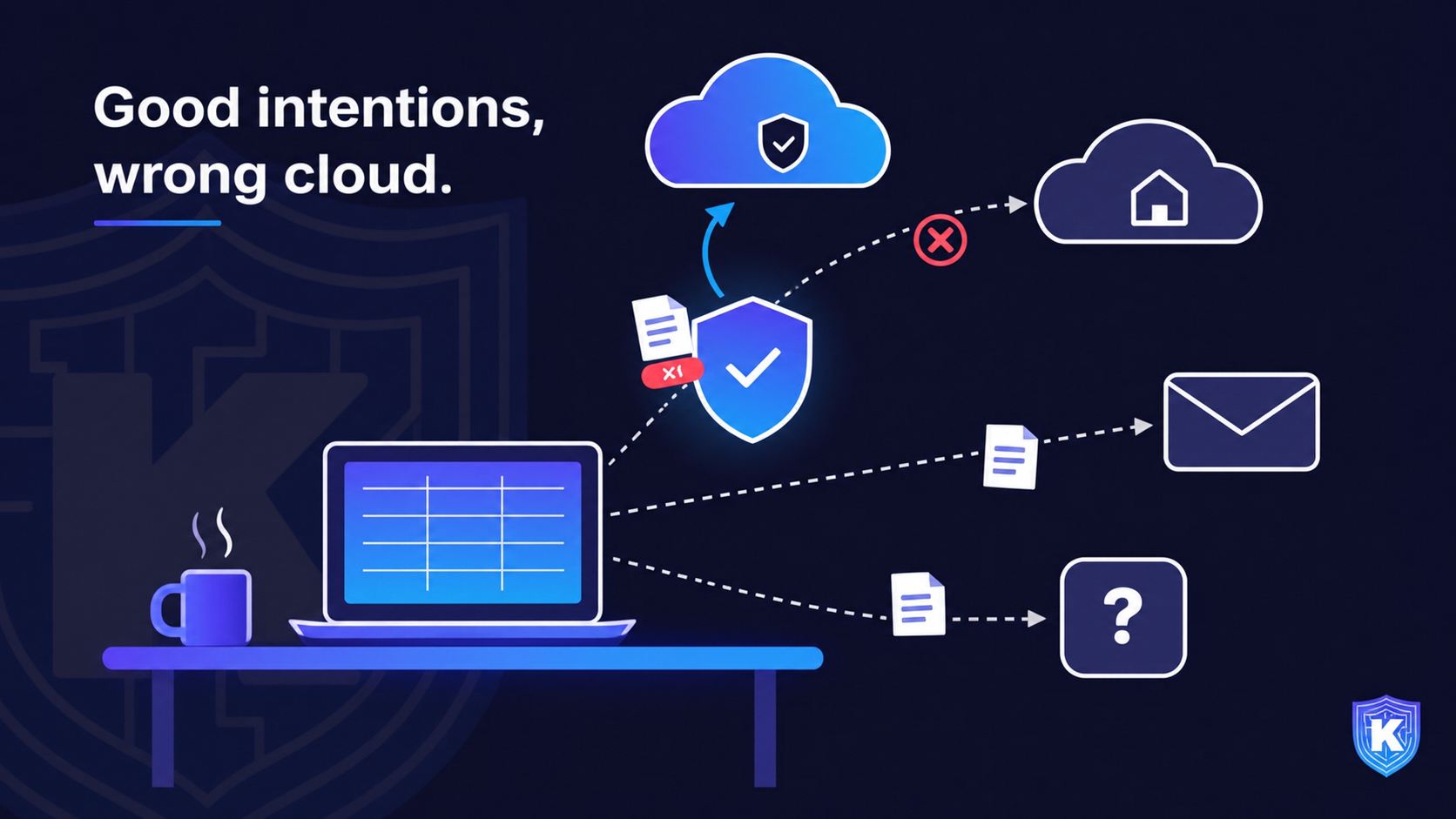
Most insider data incidents aren’t theft. They’re shortcuts taken by good employees moving files into a personal cloud drive, a personal inbox or an app IT never approved. Here’s how lean security teams can stop that drift without blocking the work people are trying to get done.
A scenario: month-end on a Sunday night
This story is illustrative, but the pattern matches what breach reports describe every year.
A 650-person medical billing company is closing the month. A senior analyst is finishing the accounts-receivable reconciliation from home on Sunday night. The VPN is slow and the shared drive keeps timing out.
So she does what feels efficient. She uploads the workbook, which includes patient names, dates of service and balances for about 9,000 people, to her personal cloud drive so she can work on it from her tablet. She also emails a copy to her personal address “just in case.” On Monday she drops a few rows into a free online spreadsheet converter to fix a formatting problem.
She meant well, and the work got done. But the company now has regulated health data in three places it can’t see, can’t delete and can’t audit. Four months later her personal email account is taken over by an infostealer on her home computer. The billing file sits in the Sent folder.
When the compliance officer starts the breach assessment, the hardest question is simple: “Where else did that file go?”
The problem: convenience is now the top insider motive
Security programs tend to picture the insider threat as a disgruntled employee stealing secrets. The data tells a different story.
- Convenience beats greed. In the 2026 Verizon Data Breach Investigations Report, convenience was the motive in 60% of Privilege Misuse breaches, well ahead of financial gain at 33%. Verizon's own example is an employee who emails company data to a personal account so they can keep working from home. Personal data was involved in 60% of these breaches (Verizon 2026 DBIR ).
- Negligence is the most common and costly insider problem.The Ponemon Institute's 2026 Cost of Insider Risks study found organizations averaged 13.8 negligent-insider incidents a year, at an average of $747,107 each. It names "employees send highly confidential data to an unsecured location in the cloud" as a warning sign that an organization is at risk (Ponemon Institute, May 2026).
- Shadow technology keeps growing. Gartner expects that by 2027, 75% of employees will acquire, modify or create technology outside IT's visibility, up from 41% in 2022 (Gartner).
- Unapproved AI tools are the newest shortcut.IBM's 2026 Cost of a Data Breach study found shadow AI, meaning workers using unapproved AI tools, involved in 43% of security incidents, up from 20% the year before, with an average breach cost of $5.39 million (IBM Cost of a Data Breach 2026). In October, Johns Hopkins Bayview Medical Center began notifying more than 3,100 patients after an employee uploaded a spreadsheet with patient data to a public AI platform that wasn't approved for use (CBS Baltimore, Oct 26, 2026).
Who it affects. Everyone who handles data and has a deadline: finance teams at month-end, sales reps building forecasts on the road, HR staff working from home, clinicians catching up on notes. The more regulated the data, the bigger the problem, because a single convenient copy can trigger notification duties.
What it costs. The direct cost is the incident itself. The larger cost is uncertainty. Once a file reaches a personal account, the company can’t see who else has access, how long it will live there, or whether it moved again. That uncertainty is what turns a quiet mistake into a reportable breach.
How Gen AI changed it
People have always taken shortcuts. Gen AI multiplied the shortcuts and made them harder to see.
- There's an app for every annoyance. Free converters, summarizers, transcription tools and AI assistants are a browser tab away. Each one is a place a file can land. Verizon found 45% of employees are now regular AI users on corporate devices, and 67% of those use non-corporate accounts (Verizon 2026 DBIR ).
- Data changes shape on the way out. A spreadsheet becomes an AI summary, a screenshot or a PDF before it reaches the personal drive. Filename and file-type rules no longer recognize it.
- Desktop apps and sync folders bypass the browser. Personal cloud clients sync quietly in the background. AI desktop apps upload files directly. Neither looks like a web upload to a proxy.
- Employees build their own tools. AI makes it easy to create a small app or automation that pulls company data into a personal workspace, with no review at all.
Why legacy approaches fall short
- Regex and pattern DLP drowns in noise. Rules that match nine-digit numbers or keywords flag harmless files and miss reshaped ones. Teams turn the rules down until they catch almost nothing.
- Network-only and cloud-proxy inspection has gaps exactly where this happens. Laptops at home or on split tunnels, sync clients, desktop apps and encrypted traffic often bypass the inspection point. A file synced to a personal drive at 11 p.m. on home Wi-Fi may never cross it.
- API-based cloud tools only see the accounts you own. They can scan your company tenant. They can't see the employee's personal one.
- Block-everything policies create the next workaround. Ban all cloud storage and people photograph screens, use phones or find an app you haven't heard of yet. The data still leaves, just with less evidence.
- Heavy enterprise DLP needs staff SMEs don't have. Months of policy tuning and a dedicated analyst team aren't realistic for a security team of two.
What a modern approach looks like
The goal isn’t to catch employees. It’s to make the safe path the easy path, and to stop the risky copy at the moment it happens, wherever the person is working.
- 1.Find out where data actually goes. Build a live inventory of the cloud storage, SaaS and AI apps in use, with how much data moves to each. Most teams are surprised by the long tail.
- 2.Pave the road you want people to use. Decide which apps are sanctioned, make sure they work well remotely, and tell people. A slow approved path is the root cause of many well-meaning leaks.
- 3.Classify by meaning and context, not patterns. Know whether a file holds patient data, payment data, source code or just a lunch menu, and combine that with who is acting, from which device and app, to which destination.
- 4.Decide on the device, across every channel. Browser uploads, desktop apps, sync folders, USB drives and copy and paste all leave from the endpoint. Enforcing there covers home networks, split tunnels and offline laptops.
- 5.Coach before you block. For a first offense, a just-in-time warning that explains the rule and offers the approved alternative changes behavior without stopping work. Block outright for regulated data headed to unapproved destinations.
- 6.Follow the data through changes. A file that is renamed, converted or screenshotted should keep its classification, so the copy is protected like the original.
- 7.Measure and tune. Track warnings, overrides and blocks by team and app. Fix the workflows that keep generating them.
This turns data protection from a list of banned sites into a feedback loop that gets quieter, and safer, every month.
How Kitecyber helps
Kitecyber is an endpoint-first security platform: one lightweight agent and one console for data security, Gen AI security, web security, zero-trust access and device management. Because enforcement happens on the device, it works the same at the office, at home and offline.
See the shadow apps. App Shield discovers the SaaS and AI apps people actually use and lets you control them. For AI apps, the console shows category, sanction status, usage time and how much data was uploaded and downloaded per app, filterable by user, group and endpoint over 1, 7 or 30 days. Admins can sanction or unsanction an app in one click. Device Shield adds shadow IT discovery and SaaS usage reports.
Stop the risky copy, not the work. Data Shield classifies data on the device across 80+ categories, including PII, PHI, payment data, IP and source code, using LLM-based understanding with local pre-processing so sensitive content stays on the device. It allows, warns or blocks at the moment of the action across the channels where well-meaning leaks happen: uploads from browsers and installed apps, cloud storage, SaaS uploads and downloads, local file sharing, network drives, USB, and real-time copy and paste, including into AI tools. Each decision weighs six context signals: device posture, OS activity, process activity, data classification, user activity and network activity.
Keep protection attached to the data. Data lineage tracks content when it is screenshotted, encoded or converted, so a reshaped copy of the billing workbook stays governed. Sensitive data discovery finds regulated files already sitting on laptops, so you can clean up before the next shortcut. User behavior analytics flags unusual patterns, such as a sudden spike in uploads, for a closer look.
Cover the gaps network tools miss. The endpoint web gateway inspects traffic on the device with no hairpinning, closes gaps from split tunneling and roaming users, and keeps policies in force offline.
What day one looks like. The agent deploys in about a day with zero-touch rollout and pre-built compliance policies for frameworks like HIPAA, PCI DSS, SOC 2 and GDPR, at under 2% CPU. Start in monitor and warn mode. Within the first week you’ll see which personal storage, SaaS and AI apps receive company data and which teams send the most. Sanction the tools people need, then move regulated data headed to unsanctioned destinations from warn to block
SME decision-maker checklist
Quick wins for this week, and questions to put to any vendor.
- 1.Which personal storage, SaaS and AI apps received company data in the last 30 days? If you can't answer by app and by team, start there.
- 2.Is our approved path fast enough for remote work? Ask three people in finance and sales how they share large files from home. Their answer tells you where the leaks are.
- 3.Does protection work off the corporate network? Test a laptop on home Wi-Fi and one fully offline.
- 4.Does the tool see desktop sync clients and desktop AI apps, not just browser uploads? Ask for a demo of both.
- 5.Can it tell a patient list from a lunch menu? Ask about classification accuracy and false-positive rates, and how classification survives a screenshot or file conversion.
- 6.Can we warn first and block later, by data type and destination? A coaching message for a first attempt prevents more leaks than a silent block.
- 7.Who will run it? Ask how long deployment takes and how many hours a week it needs from a two-person team.
Compliance angle
Well-meaning leaks are still leaks in the eyes of regulators and auditors.
- HIPAA: PHI uploaded to a personal account or an unapproved app without a business associate agreement is generally an impermissible disclosure, and may require breach notification.
- PCI DSS: cardholder data outside the defined environment expands your scope and can break compliance.t.
- GDPR: personal data in an employee's personal cloud is a loss of control. It may be a reportable personal data breach and can raise transfer questions if the provider stores data abroad.
- SOC 2 and ISO 27001:: both expect data classification, acceptable-use rules and technical controls over where information can go, plus evidence those controls work.
- CMMC: controlled unclassified information must stay on authorized systems. A copy on a personal drive is a direct finding.
- State privacy and breach notification laws: notice duties usually depend on whether data was accessed or acquired. If you can't show where a file went, you may have to assume the worst.
Logs that show each attempted transfer, the data type and the action taken help answer the question every assessment starts with: where did it go?
Key takeaways
- Convenience, not malice, drives most insider data incidents. Personal clouds, personal email and unapproved apps, now including AI tools, are where well-meaning shortcuts lead.
- Network-only, pattern-based and block-everything approaches miss home networks, desktop apps and reshaped data, or push people to worse workarounds
- Discover where data goes, pave an approved path, and decide on the device with context: coach first, block regulated data, and keep protection attached to the data.
See it on your own endpoints. Schedule a walkthrough at kitecyber.com to find out which personal clouds and unapproved apps are receiving your data today.

Ajay Gulati
Ajay Gulati is a passionate entrepreneur focused on bringing innovative products to market that solve real-world problems with high impact. He is highly skilled in building and leading effective software development teams, driving success through strong leadership and technical expertise. With deep knowledge across multiple domains, including virtualization, networking, storage, cloud environments, and on-premises systems, he excels in product development and troubleshooting. His experience spans global development environments, working across multiple geographies. As the co-founder of Kitecyber, he is dedicated to advancing AI-driven security solutions.