



Table Of Content
Localhost Is Not a Security Boundary: The MCP Servers Running on Your Developers' Laptops
-
November 8, 2026
-
Kitecyber | Data & Gen AI Security
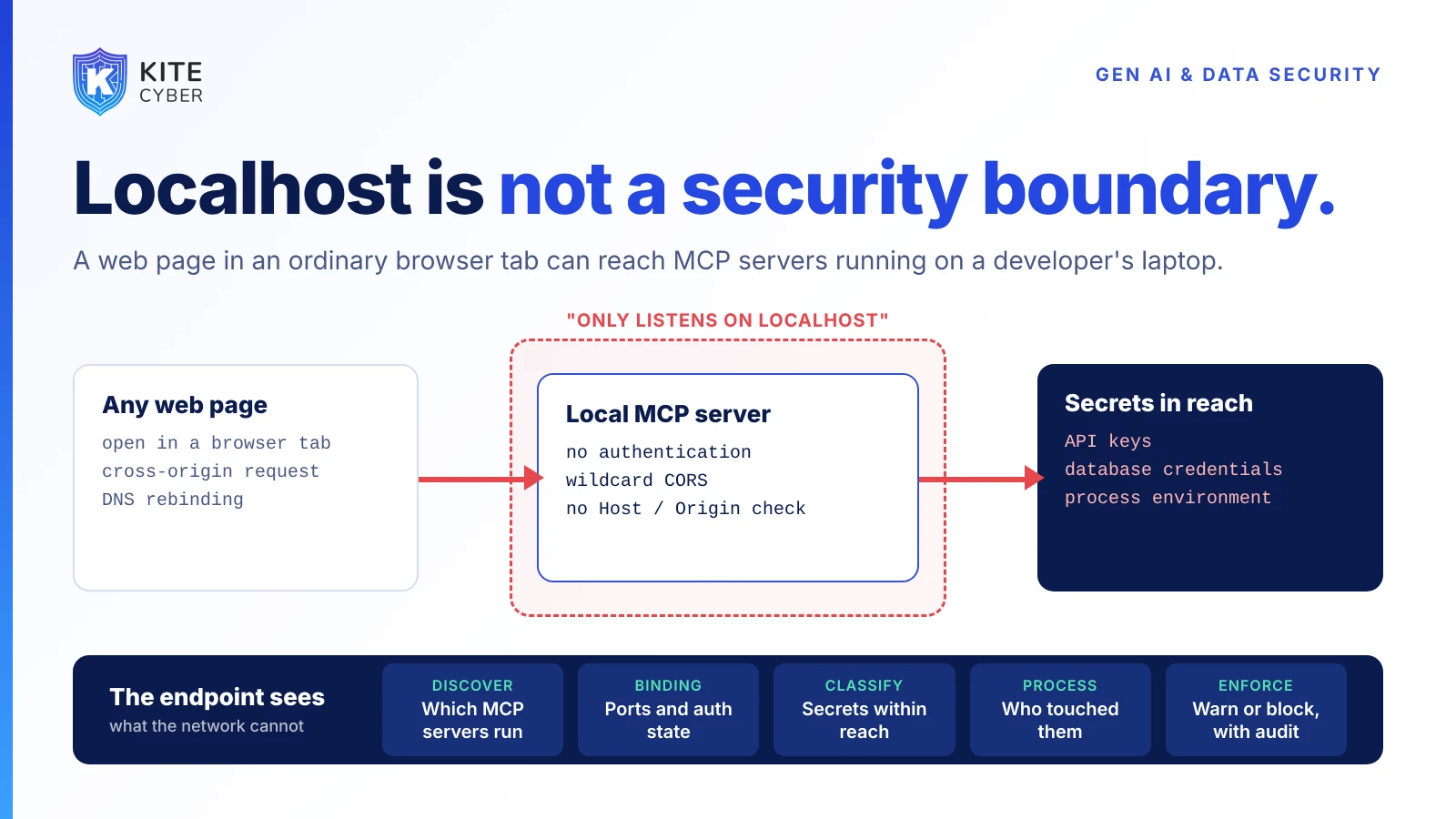
Adversa AI’s November MCP digest describes flaws where an ordinary web page could reach an MCP server on a developer’s own machine and read secrets from it. “It only listens on localhost” is no longer an answer. The endpoint is the only place that can tell you which servers exist and what they can reach.
Model Context Protocol (MCP) servers are how AI assistants and coding agents get tools: read a file, query a database, call an API. Many of them run on the developer’s laptop, started by an IDE or an agent, often over HTTP or SSE on a local port. The common assumption is that a server bound to localhost is not exposed. Adversa AI’s November 2026 MCP security digest, published 9 November, lists advisories that challenge it.
What the advisories describe
According to Adversa and the linked advisories:
- A reference server that returned the environment. The HTTP transports of @modelcontextprotocol/server-everything were reported to bind to all interfaces with wildcard CORS and no authentication, and its get-env tool returned the entire process environment to any caller. Any web page open in the developer's browser could complete the MCP handshake cross-origin and collect API keys and database credentials with no user interaction, even for a server never exposed to the network. The fix is in version 2.0.1.
- DNS rebinding against a "localhost-only" server. Basic Memory advised binding its unauthenticated SSE transport to localhost, but DNS rebinding reached it anyway, because the missing control was Host and Origin validation, not the bind address. The FastMCP guard for this exists but was off by default. A visited web page could drive the full tool surface, including finding, exfiltrating and deleting private notes. The fix is in 0.24.0.
- Credentials sent to whoever the server names. FastMCP's OAuth client wrappers did not bind to an issuer, so a malicious or compromised MCP server could point the client at its own authorization server and receive a client secret. Upgrading is not enough on its own: operators must set the new issuer parameter and rotate credentials that may have reached an untrusted endpoint.
Adversa’s separate summary of research adds a point for defenders: in a Log-To-Leak study, poisoned tool descriptions induced a logging call controlled by the attacker, and target task completion changed little, so a task that looks finished says nothing about whether data left.
Why this is an endpoint problem
These are server-side bugs, and patching them matters. But the exposure is created on the device: someone installs an MCP server, an agent starts one, a config points a tool at a database, and an API key sits in the environment. A network gateway never sees a browser tab talking to a local port. A cloud console does not know the server exists. What the device does know:
- Which MCP servers and agents are installed and running, and who configured them.
- Which ports they listen on and how they are bound, including HTTP or SSE servers with no authentication.
- What is in their environment and reachable files,using data classification to flag keys, tokens and connection strings.
- Which process and which browser session touched them,and what left the device afterward.
- Whether the device is in a trustworthy posture when it holds those credentials.
A practical checklist
- 1.Inventory local MCP servers across the fleet, including those started by IDEs and agents, and the credentials in their environments.
- 2.Flag HTTP and SSE servers without authentication, with a CORS allowlist and Host and Origin validation as the minimum.
- 3.Stop counting localhost as a boundary. Treat a local server with broad tools as a privilege grant, as Adversa recommends.
- 4.Rotate credentials that sat in the environment of any affected server.
- 5.Authorize at the host. Put policy on tool calls and narrow generic tools to specific ones; do not rely on keyword or regex filters alone.
- 6.Prefer stdio or per-session servers where the design allows.
Where Kitecyber fits
Kitecyber’s Gen AI and data security runs on the endpoint, bringing together device posture, operating system and process activity, user activity, network activity and data classification across 80+ categories. That lets security teams see which AI tools and local servers are running, what sensitive data and credentials sit within their reach, which process accessed them, and where that data went next, then apply allow, warn or block policy with an audit trail. The lightweight agent (under 2% CPU) typically deploys in about a day. It complements, rather than replaces, patching and secure server configuration.
Book a Kitecyber walkthrough at kitecyber.com to see local AI tools, credentials and data context in one view.