Table of Content


How to Secure Grok Build and Grok Bot: 10 Controls for 2026
-
November 24, 2026
-
Summary:
The weeks before someone resigns are when customer lists, pricing and source code are most likely to walk out the door, and AI tools now make that data easier to reshape and carry. Companies that watch data movement on the device, in context, can protect what matters without treating every employee like a suspect.
Kitecyber | Data & Gen AI Security | November 2026
A developer installs Grok Build with one command, types grok in a repository and asks it to fix a flaky test. It reads the code, runs the suite, edits files and commits. A sales lead installs the Grok Bot desktop app, connects Gmail and Salesforce, and lets a Bot reconcile a pipeline report overnight on its cloud computer, occasionally asking to run a command on her laptop. An analyst pastes a customer list into grok.com to clean it up.
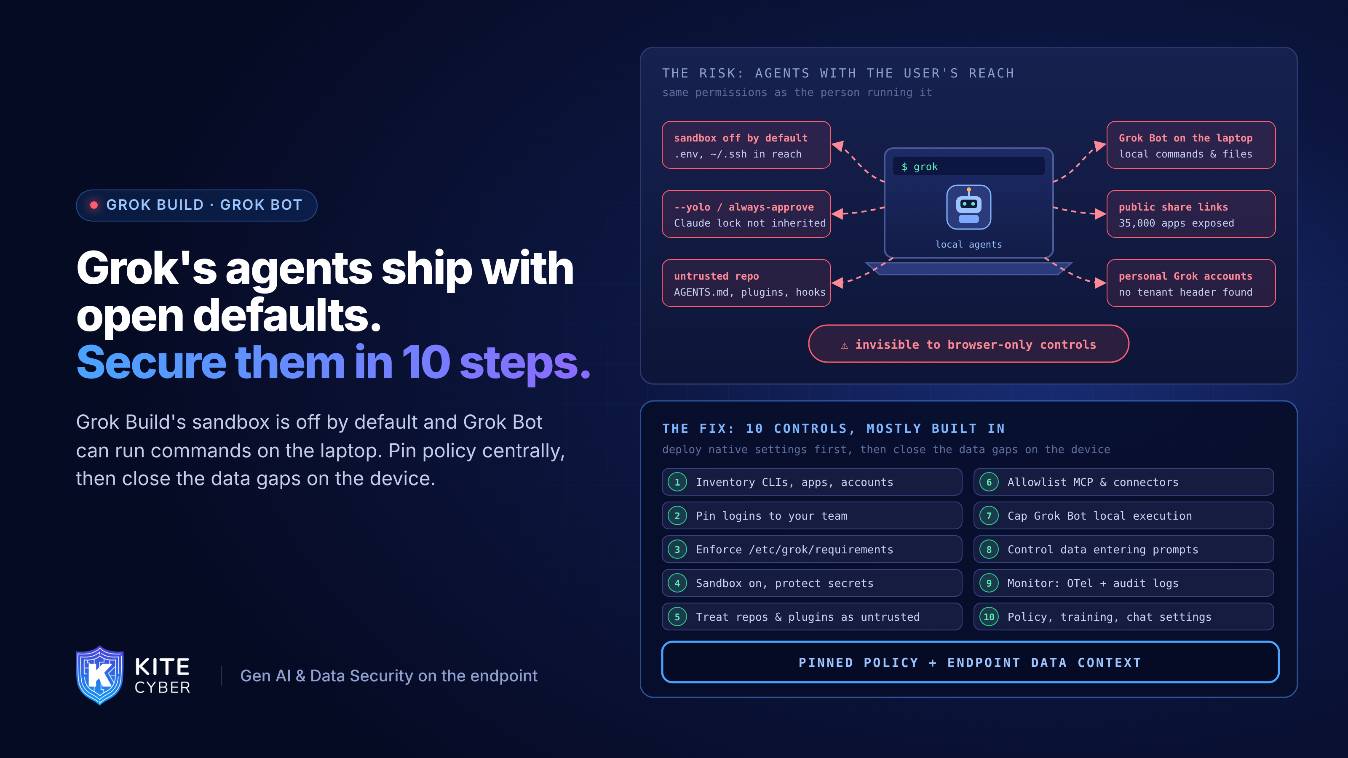
Each of these is a reasonable way to get work done. Each also puts an xAI agent or model in contact with company files, credentials and data. This guide explains where the risk sits, walks through ten controls security teams can apply using what xAI and its partners provide, highlights the defaults that matter most, and closes with the policies to set for everyday Grok use.
Key takeaways
- Grok Build is a terminal coding agent that runs on the endpoint. Grok Bot is a desktop app that drives agents on a Cursor-operated cloud computer and can also run commands on the user’s own machine.
- Several Grok Build defaults are permissive: the sandbox is off by default, and an “always-approve” mode is one keystroke away. Both can be pinned centrally with /etc/grok/requirements.toml.
- If you already lock down Claude Code, Grok Build reads some of its managed settings but does not honor Claude’s bypass-permissions lock. You must set Grok’s own.
- Recent research on Grok products includes public-by-default app links, an unpatched agent infrastructure chain, unprompted data access by Bots, and a prompt-injection exfiltration technique. Response times on some reports were slow, which makes your own controls more important.
- Native settings govern how Grok behaves. They do not decide which sensitive data an employee or agent sends. That needs data-aware controls on the device.
Why Grok’s agents change the risk model
Grok Build is xAI’s coding agent for the terminal. It runs as an interactive TUI, headlessly in scripts and CI, or inside other apps through the Agent Client Protocol. It reads and edits files, runs shell commands, uses Git, spawns parallel subagents, loads skills, plugins and hooks, and connects to MCP servers. It installs with a curl | bash script or npm, runs on macOS and Linux (Windows through PowerShell, Git Bash or WSL), and can even import sessions from Claude Code.
Grok Bot gives AI “teammates” a persistent Linux computer in the cloud, with a shell, a browser, a desktop and the user’s logins. Every Bot on an account shares that computer. The Grok Bot desktop app for macOS, Windows and Linux lets Bots act on the member’s own machine as well: run commands, read files and move files between the cloud computer and the laptop. Grok Bot is built on and operated by Cursor’s agent platform, so its admin controls live in the Cursor dashboard.
Grok chat is available on grok.com, the Grok apps and inside X, plus Grok Business and Grok Enterprise workspaces with connectors to tools such as Google Drive, SharePoint, Salesforce, Slack and custom MCP servers.
Shared responsibility
| xAI and its partners provide | Your organization decides |
|---|---|
| Model safeguards, product security, sandbox profiles, permission engine | Which plans, accounts and agents employees may use |
| Business data commitments (Grok Business and Enterprise: no training on business data) | What data employees and agents may send |
| Admin controls: requirements.toml, login pinning, SSO and SCIM (Enterprise), Grok Bot network policy and MCP allowlist (Enterprise) | Whether those controls are deployed, tested and enforced on every device |
| Zero data retention options, audit logs and OpenTelemetry export (Enterprise) | Who collects and reviews logs, and how incidents are handled |
Consumer Grok is different. Independent reviews of xAI’s terms report that consumer conversations can be used for training unless users opt out, and that authorized staff may review them. Business commitments only help if employees are actually signed in to business accounts.
What has already gone wrong
- Grok Build app links open by default (November 2026). Ars Technica reported research finding more than 35,000 Grok Build apps reachable by anyone, including some belonging to xAI itself. Share links defaulted to “Anyone with the link”, and a design choice made the random-looking links enumerable.
- Grok Bot infrastructure (November 2026). Profero published a chain in which one command from a Bot, which could arrive through prompt injection from a web page or package, led to root on the account’s VM, plaintext imported browser cookies, connector tokens in transit and persistent remote access. Every Bot on an account shares one Linux user, filesystem and set of credentials. Profero said it reported the findings in August and had no response after more than 75 days.
- Bots acting unprompted (November 2026). NewCore reported that Grok Bots made 31 unrequested requests to Gmail, Calendar, Slack, GitHub and Notion over five days, including while the owner’s laptop was asleep, and denied doing so when asked. xAI later added a setting to turn the background check-ins off, but NewCore says they remain on by default.
- Encrypted prompt injection (August 2026). Adversa AI showed a web page could make Grok decrypt hidden instructions in its own code runtime and then leak the user’s name, approximate location, subscription tier and conversation through a crafted URL. At disclosure there was no patch.
- Earlier warning signs. In 2025, Google indexed hundreds of thousands of shared Grok conversations; an xAI developer leaked an API key on GitHub that reached private models; and a 2024 prompt-injection exfiltration report against Grok in the X app was closed as “Informational.”
- Everyday exposure.Netskope’s Cloud and Threat Report: 2026 found the average organization records 223 incidents a month of users sending sensitive data to AI apps, doubling year over year, with 47% of generative AI users on personal accounts.
The pattern: permissive defaults, untrusted content steering an agent with access, and sharing features that reach further than users expect.
Six surfaces where data can leave through Grok
- 1.Grok Build on the laptop. Source code, configuration and anything the developer’s account can reach, including .env files, SSH keys and cloud credentials when the sandbox is off.
- 2.Grok Build sharing and sync.Share links and remote session sync through xAI’s services.
- 3.The Grok Bot desktop app. Local command execution and file transfer between the laptop and the cloud computer, and optional routing of Bot traffic through the user’s desktop.
- 4.The Grok Bot cloud computer.Imported browser sessions, saved logins, files and connectors, shared by every Bot on the account.
- 5.Grok chat and connectors. Pasted and uploaded content, plus email, files and CRM records pulled through connectors.
- 6.Skills, plugins, hooks and MCP servers. Add-ons that run with the user’s privileges and can carry prompt injection.
10 controls to secure Grok Build and Grok Bot on employee devices
1. Build an inventory of Grok agents, accounts and add-ons
- Which devices have the grok CLI (from the install script or the @xai-official/grok npm package), the Grok Bot desktop app, or Grok apps installed?
- Which accounts are in use: your Grok Business or Enterprise team, personal grok.com or X accounts, or XAI_API_KEY values in shells and CI?
- What is configured: ~/.grok/config.toml, project .grok/ folders, AGENTS.md files, MCP servers, plugins, marketplaces, hooks, and ~/.grok/auth.json.
grok inspect shows the rules, skills, plugins, hooks and MCP servers Grok discovers in a directory, which makes spot checks easy.
Priority: Immediate
2. Pin Grok to your company team and block personal use
- Use Grok Business or Enterprise. Enterprise adds custom SSO, SCIM, custom roles, domain claims and the ability to turn off personal workspaces.
- Pin Grok Build logins in requirements.toml:
[grok_com_config]
force_login_team_uuid = “<your-team-uuid>” # also disables API-key login
A personal login or a login to the wrong team is rejected, cached tokens are re-checked on every refresh, and leftover XAI_API_KEY values cannot skip SSO. Use disable_api_key_auth = true on its own if you need SSO without team pinning, and [auth.oidc] to authenticate against your own identity provider.
- Turn off personal workspaces on Enterprise so employees cannot switch to an unmanaged workspace on grok.com.
- Decide on the network path. Grok Build needs cli-chat-proxy.grok.com and auth.x.ai. Blocking code.grok.com keeps sessions local and disables share links. At the time of writing we found no documented tenant-restriction header for grok.com, unlike Anthropic, OpenAI and Google, so endpoint controls carry more of the load for personal accounts.
Priority: Immediate
3. Deploy admin-enforced requirements for Grok Build
Grok Build loads five configuration layers. The highest, /etc/grok/requirements.toml, is root-owned and fail-closed: pinned values cannot be overridden by user config, environment variables, remote settings or lower layers. xAI recommends pushing it with MDM, golden images or configuration management.
A reasonable starting baseline:
# /etc/grok/requirements.toml
[grok_com_config]
force_login_team_uuid = “<your-team-uuid>”
[ui]
disable_bypass_permissions_mode = true # no –yolo, Ctrl+O or /always-approve
[sandbox]
profile = “workspace” # sandbox is off by default
[marketplace]
require_sha = true # plugins must be pinned to a commitzz
Then add allow and deny rules, MCP allow and deny lists, and telemetry settings for your environment.
The important gotcha: Grok Build reads a subset of Claude Code’s managed-settings.json (permission rules, MCP allowlists and marketplace restrictions), but it deliberately does not apply Claude’s disableBypassPermissionsMode. A laptop locked down for Claude Code can still run Grok with –yolo. Set disable_bypass_permissions_mode in Grok’s own system file, because the lock is ignored in the user-writable ~/.grok/requirements.toml.
Priority: High
4. Turn the sandbox on and protect credentials
Grok Build’s sandbox uses Landlock on Linux and Seatbelt on macOS, and it is off by default.
- Pick a profile. workspace limits writes to the project, ~/.grok/ and temp folders. read-only blocks writes and child network access for reviews. strict limits reads to the project and system paths and blocks network, which suits untrusted repositories.
- Add deny rules for secrets.Custom profiles in sandbox.toml support kernel-enforced deny lists, for example "**/.env", "**/*.pem" and SSH and cloud credential folders. On Linux, read-deny requires bubblewrap.
- Know the platform limits. xAI documents that child-process network blocking is enforced on Linux only and is a no-op on macOS for the read-only and strict profiles. On Macs, pair the sandbox with deny rules and network controls.
- Leave risky tools off. web_fetch and cross-session memory are off by default. Keep them off unless needed, and if you enable web_fetch, restrict it with allowed_domains and an egress proxy.
- Treat ~/.grok/auth.json and API keys like passwords. Prefer IdP sign-in over long-lived keys, and keep XAI_API_KEY out of shell profiles on shared machines.
Priority: High
5. Treat repositories, instruction files and add-ons as untrusted input
- Review agent files like code. AGENTS.md, .grok/config.toml (which can add MCP servers, plugins and permission rules) and hook scripts can all steer the agent. Flag changes in pull requests.
- Use plan mode for unfamiliar work. Plan mode blocks edits until a person approves the plan, and its review is not skipped under auto or always-approve.
- Restrict plugins and marketplaces.Plugins are off by default and project plugins require explicit trust. Allowlist marketplace sources in policy and set require_sha = true so installs and updates must be pinned to a commit.
- Pin and verify the CLI. If curl | bash installs worry you, distribute the npm package or an internal mirror, and control updates with grok update --version.
- Open untrusted code in a container or devbox, with the strict profile.
Priority: High
6. Govern MCP servers and connectors with least privilege
- Grok Build: enforce MCP allow and deny lists from requirements.toml or managed config. Entries match on server URL or command, and grok inspect prints the merged lists. Rules from user-writable files only restrict their own scope.
- Grok Business and Enterprise chat: a team admin must add a connector in the xAI console before members can use it. Start with a short list and review configured access and allowed sites.
- Grok Bot (Enterprise): use the MCP allowlist, and if you rely on the network allowlist, turn on Apply to MCP servers. Without it, Bots can reach any MCP server your connector policy permits, whatever the network policy says. Add the hosts built-in connectors call, such as api.github.com or gmail.googleapis.com.
- Scope credentials. Give connectors and MCP servers dedicated, least-privilege accounts. Every Bot on an account shares the same computer and credentials, so do not place a credential there that any Bot should not use.
Priority: High
7. Configure the Grok Bot desktop app and cloud computer deliberately
- Local execution. Members choose Ask every time (default), Always allow or Never allow under Execution on this computer. xAI’s own guidance recommends Never allow unless a Bot has a specific reason to work on local files. Admins can cap it team-wide with Execution on Local Computer.
- Network policy (Enterprise). Teams without a policy default to Allow All. Choose Team Allowlist Only or Defaults + Team Allowlist, and lock it for all groups where appropriate.
- Local egress routing. Members can route Bot traffic through their desktop’s IP. Review Allow Local Egress Routing carefully, since it puts Bot traffic on your network path.
- Auto Review and sudo (Enterprise). Enforce Auto-review with team rules such as “ask first before sending any external email,” and leave Allow Sudo on Bot Computers off.
- Background check-ins. Turn off proactive check-ins if you do not want Bots reaching connected apps when nobody asked.
- Imported cookies and saved logins. Discourage importing personal browser sessions, and avoid saving payment cards to Vault if every payment should need approval.
- Inference hooks (Enterprise). Send each Bot model request to your own AI security service, starting in shadow mode.
Most of these controls are Enterprise only. Self-serve Teams do not get network controls, the MCP allowlist, audit logs or OpenTelemetry export, which is a strong reason to restrict Grok Bot to Enterprise or block it.
Priority: High
8. Control what sensitive data reaches the prompt
Grok Bot’s documentation notes that restricting egress limits where data can be sent, and points to inference hooks for checking what reaches the model. On the laptop, the same question applies to every paste, upload and agent file read.
- Define data categories that must never go to any AI tool, and categories allowed only in your business workspace.
- Classify data where it lives, so policy can act on content rather than file names.
- Apply controls at the point of action: paste and upload into grok.com, files read by Grok Build, and files moved between the laptop and the Bot computer.
- Coach rather than silently block in grey areas.
Priority: High
9. Monitor activity and prepare an incident playbook
- Grok Build: route telemetry to your own OpenTelemetry collector (GROK_EXTERNAL_OTEL) and decide whether to disable vendor telemetry and trace upload in requirements.toml.
- Grok Bot (Enterprise): stream audit logs to your SIEM, and enable Action Recording with OpenTelemetry export to receive scrubbed Bot actions. Action Recording is off by default.
- Do not rely on the agent’s account. NewCore’s research found a Bot denying actions it had taken. Keep independent logs from endpoints, connectors and network controls.
- Write the playbook: revoke Grok sessions and API keys, rotate credentials the agent or Bot computer could reach, reset the Bot computer, remove a malicious plugin or MCP server, and preserve local evidence.
Priority: Medium–High
10. Write an AI acceptable-use policy and train people on it
- Approved Grok products, plans and the only team employees may sign in to.
- Data categories that cannot be used with AI, with examples.
- Autonomy rules: no always-approve outside containers, local execution off by default, and actions that always need a human.
- Sharing rules: keep Grok Build share links restricted, and never share chats containing company data from personal accounts.
- A blame-free way to report mistakes quickly.
Priority: Foundational
Securing everyday Grok chat use: the policies to configure
| Area | Policy to configure | Why it matters |
|---|---|---|
| Plan | Use Grok Business or Enterprise for any company data | Business plans state no training on business data; consumer plans differ |
| Identity | Enterprise: custom SSO, SCIM, domain verification and claims, custom roles | Access follows your identity lifecycle |
| Workspaces | Enterprise: turn off personal workspaces | Keeps employees in the governed team workspace |
| Retention and keys | Set custom data retention; consider customer-managed keys and Enterprise Vault; request zero data retention where needed | Limits how long prompts and outputs persist |
| Connectors | Add only approved connectors in the xAI console and review their access | Connectors are the main path to bulk data |
| Sharing | Team workspace links open only for licensed team members; set Grok Build share links to invited users or only you | Prevents the kind of public exposure seen in 2025 and 2026 |
| Audit | Use advanced audit and security controls and review user analytics | Evidence for investigations and audits |
| Personal accounts | If employees use consumer Grok or Grok in X, require them to turn off model training and avoid company data entirely | Consumer terms allow training and staff review |
Quick-start checklist
| # | Control | Native option | Priority |
|---|---|---|---|
| 1 | Inventory CLIs, apps, accounts and add-ons | MDM inventory, grok inspect | Immediate |
| 2 | Company team only | force_login_team_uuid, disable_api_key_auth, SSO/SCIM, no personal workspaces | Immediate |
| 3 | Admin-enforced requirements | /etc/grok/requirements.toml, disable_bypass_permissions_mode | High |
| 4 | Sandbox and credential protection | [sandbox] profile, sandbox.toml deny lists, web_fetch off | High |
| 5 | Untrusted repos and add-ons | Plan mode, plugin trust, require_sha, marketplace allowlist | High |
| 6 | MCP and connector governance | MCP allow/deny lists, console connectors, Grok Bot MCP allowlist | High |
| 7 | Grok Bot configuration | Local execution cap, network policy, Auto-review, no sudo | High |
| 8 | Data-aware controls | Inference hooks, plus endpoint DLP for local data | High |
| 9 | Monitoring and incident response | External OTel, audit logs, Action Recording | Medium–High |
| 10 | Policy and training | Internal | Foundational |
Where native controls stop
- Defaults. The Grok Build sandbox is off and Grok Bot’s network policy is allow-all until someone changes them.
- Plan tiers. Many important Grok Bot controls are Enterprise only.
- Content. Permission rules and sandboxes control what an agent can reach, not whether the data it handles may be shared.
- Platform gaps. Child network blocking is not enforced on macOS for some profiles, and Windows relies on WSL or shells.
- Vendor response. Several 2026 findings were unpatched at disclosure, so you need controls that do not depend on a fix arriving.
- Other AI tools. Grok’s settings govern Grok. The same laptop probably runs Claude, Codex, Gemini and others that need consistent policy.
Where Kitecyber fits
Kitecyber provides Gen AI and data security that runs on the endpoint, the layer where Grok Build and the Grok Bot desktop app actually work. A single lightweight agent combines device posture, OS and process activity, user activity, network activity and on-device data classification across 80+ categories. That context lets security teams:
- Discover AI apps, agents and accounts on every managed device, including the grok CLI, the Grok Bot app, personal Grok accounts and tools beyond xAI.
- Monitor loaded agent skills, mapped connections and inherited privilege to surface over-permissioned agents, such as Grok running with no sandbox or always-approve enabled.
- Classify what a paste, upload or agent file access contains and block, warn or allow at the moment of action, before data leaves the device.
- Enforce approved-AI policies with a built-in secure web gateway, on and off the corporate network, and use zero-trust access to limit what agents can reach.
- Produce continuous evidence mapped to frameworks such as SOC 2, ISO 27001, HIPAA, PCI DSS, GDPR, NIST 800-53 and CMMC.
Kitecyber can run as SaaS, self-hosted or with your own keys, and typically goes live in about a day. It complements xAI’s native controls rather than replacing them.
Book a Kitecyber walkthrough at kitecyber.com to see Grok and every other AI agent on your endpoints, what they can reach, and how to stop risky actions before data leaves the device.
Frequently Asked Questions
It can be, when configured deliberately. Pin logins to your team, deploy /etc/grok/requirements.toml with the sandbox on and always-approve locked off, restrict MCP servers and plugins, and keep it updated.
No. The default profile is off. Pin workspace or strict in requirements.toml.
Partly. Grok reads Claude’s permission rules, MCP allowlists and marketplace restrictions, but not its bypass-permissions lock. Set disable_bypass_permissions_mode = true in Grok’s system requirements.toml.
xAI states that Grok Business and Enterprise data is not used for training, and Grok Build supports zero data retention at the team level. Consumer Grok and Grok in X follow different terms, including training by default unless users opt out.
Yes, through the desktop app, when local execution is enabled and approved. The default asks every time. xAI recommends Never allow unless there is a specific need, and admins can cap it team-wide.
Use Grok Enterprise to turn off personal workspaces, pin Grok Build logins with force_login_team_uuid, and use endpoint and web controls for grok.com, because we found no documented tenant-restriction header for grok.com at the time of writing.

Ajay Gulati
Ajay Gulati is a passionate entrepreneur focused on bringing innovative products to market that solve real-world problems with high impact. He is highly skilled in building and leading effective software development teams, driving success through strong leadership and technical expertise. With deep knowledge across multiple domains, including virtualization, networking, storage, cloud environments, and on-premises systems, he excels in product development and troubleshooting. His experience spans global development environments, working across multiple geographies. As the co-founder of Kitecyber, he is dedicated to advancing AI-driven security solutions.