Table of Content


The AI Agent Supply Chain: Stop Skills, Plugins and MCP Servers From Becoming a Back Door
-
November 22, 2026
-
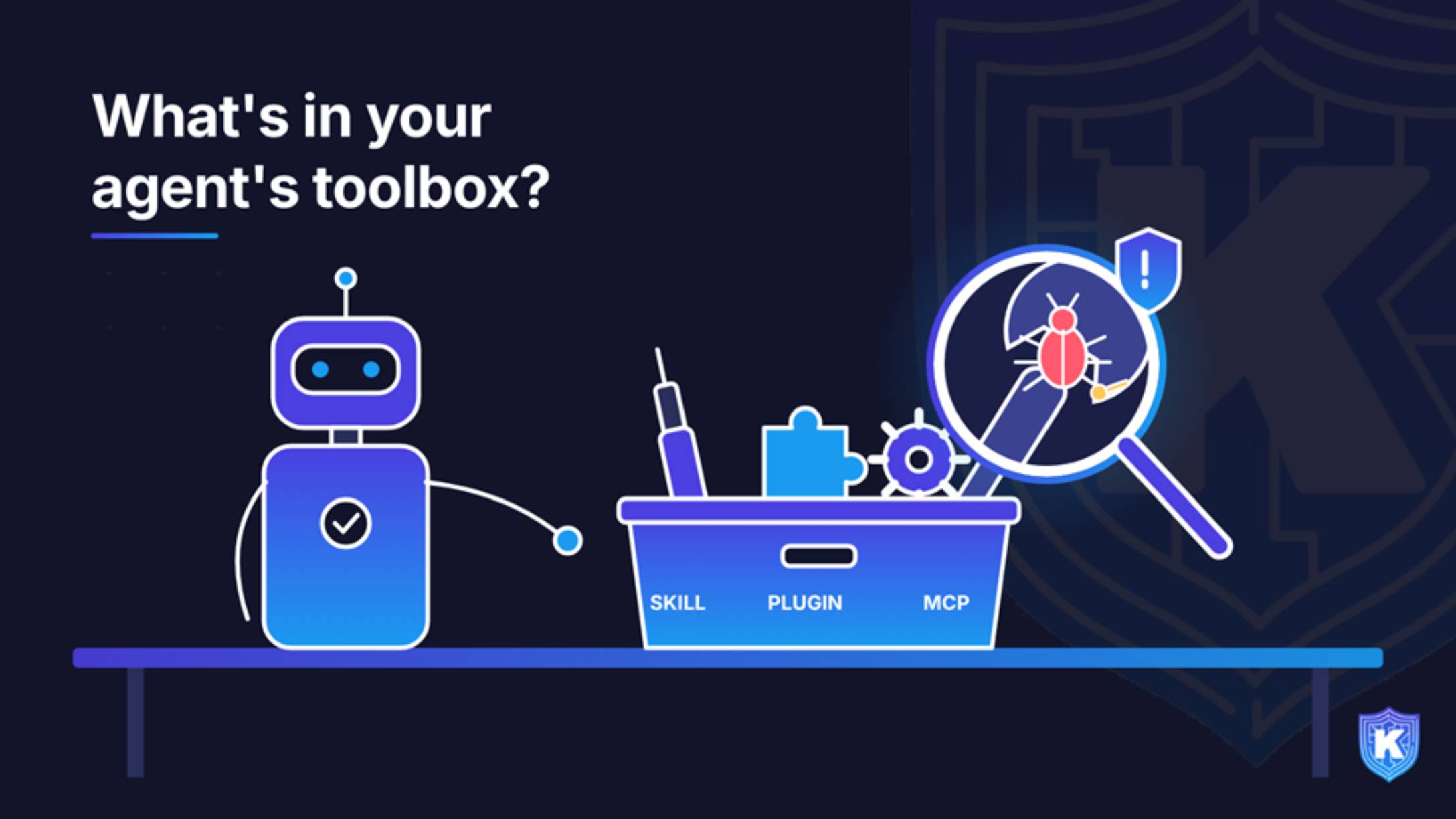
AI agents on your employees’ laptops now load third-party skills, plugins and MCP servers that run with real credentials and update themselves without anyone reviewing them. Here’s how to see what your agents have installed, fix the riskiest pieces first, and keep sensitive data on the device even if one of those pieces turns bad.
A scenario: the helper that changed overnight
This story is illustrative, but each step mirrors incidents reported in the last two months.
A 400-person logistics company lets its engineers and operations staff use AI assistants. One platform engineer connects her coding agent to the ticketing system with a community MCP server. Setup is one line in a config file. The server holds her API token and starts automatically whenever the agent does.
A second team member installs a popular “brand voice” skill from a public marketplace to help the marketing agent write faster. Nobody in IT knows either add-on exists. They don’t appear in the software inventory, because they aren’t apps. They are files and packages that the agents fetch and run.
Six weeks later, a package deep inside the MCP server’s dependency tree is hijacked upstream. The next time the agent starts, the server quietly pulls the new version. It reads the engineer’s cloud keys and a customer export sitting in her Downloads folder, and sends them to a lookalike domain. The skill, meanwhile, has been appending hidden instructions to the agent’s global settings file, so every future session starts with an attacker’s agenda.
The security lead learns about it from a cloud bill for AI usage nobody ordered. The first question from the CEO is simple: “Which of our machines run that thing?” Nobody can answer quickly.
The problem: agents bring their own software
An AI agent is rarely just one app. It is an app plus a growing set of add-ons: skills (packaged instructions and scripts), MCP servers (connectors that let the agent use tools like ticketing, code repositories or cloud consoles), extensions and plugins, and hooks that run at start-up. Each add-on is third-party code. Most run with the user’s own permissions and often with stored tokens. Together they form a software supply chain that lives on the endpoint, outside the review process your other software goes through.
The last two months show how exposed that chain is:
- Marketplaces carry malicious and unsafe add-ons. Researchers who scanned the 10,000 most popular skills on each of two major skill marketplaces found 18 that were actively malicious and rated more than 64% as vulnerable. One skill silently appended instructions fetched from a remote server to the agent's global configuration file, a prompt injection that persists across every future session (skill ecosystem analysis, Nov 9, 2026).
- "Pinned" doesn't mean frozen.In a review of 35 MCP servers, 23 had a recommended install that pulls dependencies fresh from a public registry. One server pinned to a single release was rebuilt 19 times in five weeks and ran 15 different sets of dependencies, with 23 of its 69 packages changing versions, all without anyone touching the configuration (Cyber Security News, Nov 11, 2026).
- Trusted AI components get hijacked upstream.On Oct 21, attackers pushed a malicious release of LiteLLM, a widely used open-source AI gateway, to PyPI and Docker. It was live for about two hours and ran a credential stealer on Python start-up, targeting cloud keys, SSH keys and AI tool credentials (LiteLLM incident report; BleepingComputer).
- Even official channels can serve tampered add-ons. On Oct 29, attackers used a stolen credential to place malicious copies of a popular AI coding extension in an AI code editor's extension marketplace. The copies were available for about 11 hours, and up to 5,000 developers may have received them. The code tried to install persistent SSH backdoors (BleepingComputer, Nov 14, 2026).
Who it affects. Developers and IT admins are the obvious targets, because their agents hold the most powerful keys. But desktop assistants now install skills for finance, sales and marketing staff too. Any employee whose agent can read files, run commands or reach the internet is part of the chain.
What it costs. Gartner predicts that by 2028, 25% of enterprise Gen AI applications will have at least five minor security incidents a year, up from 9% in 2025, and calls out supply chain threats and third-party MCP components as risks to mitigate (Gartner, Apr 9, 2026). When an incident becomes a breach, the global average cost is now $4.99 million, a record high (IBM Cost of a Data Breach 2026). For a mid-size company, one poisoned add-on can expose cloud accounts, source code and customer data in a single step.
How Gen AI changed the supply chain problem
Software supply chain attacks are not new. What Gen AI changed is who installs the software, how often it changes, and how much it can reach.
- The installer is now the agent, or an employee in a hurry. Adding a skill or MCP server takes a line of config or a single chat request. There is no ticket, no package review and often no admin rights needed.
- Add-ons inherit the keys to the kingdom.An MCP server for a cloud console or a code repository usually holds the token of the person who set it up. If any package inside it is poisoned, that code runs in the same process and can read the same tokens and files.
- Updates happen silently, at start-up. One-step launchers fetch the latest dependencies whenever an agent restarts. The add-on's version number never changes, so nothing looks different.
- Instructions are a new kind of payload.A malicious skill doesn't need malware. It can rewrite the agent's settings so the agent itself carries out the attacker's wishes, and can tell the agent not to mention it.
- Agents act fast and without asking. Sessions running in auto-approve mode can read a file, run a command and send data out in seconds. Gartner now predicts that 70% of enterprises will sandbox agentic development workflows by 2030, up from 10% in 2026, citing "untrusted code execution and privilege escalation" (Gartner, Nov 18, 2026).
The U.S. National Security Agency’s guidance on MCP makes the same point: components can be configured to access data with no access control at all, and organizations should apply their strictest code review to MCP servers and scan for unauthorized or outdated deployments (NSA, May 2026).
Why legacy approaches fall short
- Software inventory and app allowlists stop at the app. They see that a coding assistant is installed and approved. They don't see the dozen MCP servers, skills and hooks it loads, or which versions it pulled this morning.
- Network-only and cloud-proxy inspection misses the local layer. Many MCP servers talk to the agent over local pipes, never touching the network. When a poisoned package does call out, it often uses ordinary encrypted web traffic to a lookalike domain, which is hard to tell apart from normal use. Laptops off the corporate network may not be inspected at all.
- Pattern-based DLP can't tell a helper from a thief. A stolen token or a customer file looks the same whether the agent is sending it to an approved service or an attacker's server. Without context about which process acted and what data it touched, rules either miss it or flood the team with alerts.
- Pattern-based DLP can't tell a helper from a thief.A stolen token or a customer file looks the same whether the agent is sending it to an approved service or an attacker's server. Without context about which process acted and what data it touched, rules either miss it or flood the team with alerts.
- Heavy code-scanning tools live in the build pipeline, not on laptops.They're built for software you ship, need specialist staff, and don't watch what an assistant installs on a sales manager's machine at 4 p.m. on a Friday.
What a modern approach looks like
Treat agent add-ons like any other third-party software, but manage them where they actually run: on the device. Six principles cover most of the risk.
- 1.Inventory the add-on layer, not just the app.For every device, know which agents are installed and which MCP servers, skills, extensions, hooks and config files each one loads, with versions. This is the AI equivalent of a software bill of materials, kept current automatically.
- 2.Judge each add-on by what it can do and where it came from.An add-on that runs third-party code, holds secrets or admin access, sends data out, or acts without approval deserves more scrutiny than a read-only formatter. Flag unpinned installs, unknown publishers and known vulnerabilities.
- 3.Freeze what you approve. Pin versions and lock dependencies so an add-on can't change itself at start-up. Give each approved add-on a named owner and a review date. Gartner's guidance is to formally review MCP use cases, exclude high-risk combinations, and tighten oversight of third-party MCP components (Gartner, Apr 9, 2026).
- 4.Give add-ons their own, smaller keys. Each MCP server should get a dedicated token with the least access it needs, not the admin's personal credentials. Keep wallet keys, cloud root credentials and .env files out of the agent's reach.
- 5.Protect the data, assuming one add-on will go bad.You can't vet every package forever. Classify sensitive data on the device and decide at the moment an agent, or anything it launched, tries to read or send it. That limits the blast radius of the add-on you missed.
- 6.Watch for change. A new MCP server, a modified settings file or an agent switching to auto-approve mode should raise a signal within minutes, not show up in a quarterly audit. For high-risk development work, run agents in sandboxed environments.
None of this requires banning AI. It requires the same discipline you already apply to browser extensions and SaaS apps, extended one layer deeper.
How Kitecyber helps
Kitecyber is an endpoint-first security platform: one lightweight agent and one console. Because it runs on the device, it sees the agent add-ons that never touch the network, and it can protect data at the moment an agent reaches for it.
See every agent and what it loads. The AI Apps & Agents inventory lists the AI agents and coding assistants found across endpoints, with user counts, device counts and installed versions. A per-agent drill-down shows which devices and users run it and any known CVEs, across macOS, Windows and mobile. AI browser extensions get their own inventory.
Rank add-ons by real risk. The AI Agent Security posture view inventories each agent’s MCP servers (local or remote), connectors, extensions, skills and hooks, workspaces, configs and running processes, and risk-scores each one. A capability matrix shows whether an agent runs code, changes external data, sends data out, holds secrets and admin access, acts without approval, or runs third-party code. Supply chain is one of its key permission categories, alongside autonomy (sessions in auto-approve mode), command execution and network reach. Each device and agent gets a High, Medium or Low rating with a plain-language reason, such as “It can run unpinned or untrusted third-party code,” plus prioritized recommendations like “pin the git MCP server.” Blind spots show what a scan couldn’t see and how to fix it. Twenty-six built-in risk rules do the sorting, so a lean team starts with the handful of findings that matter.
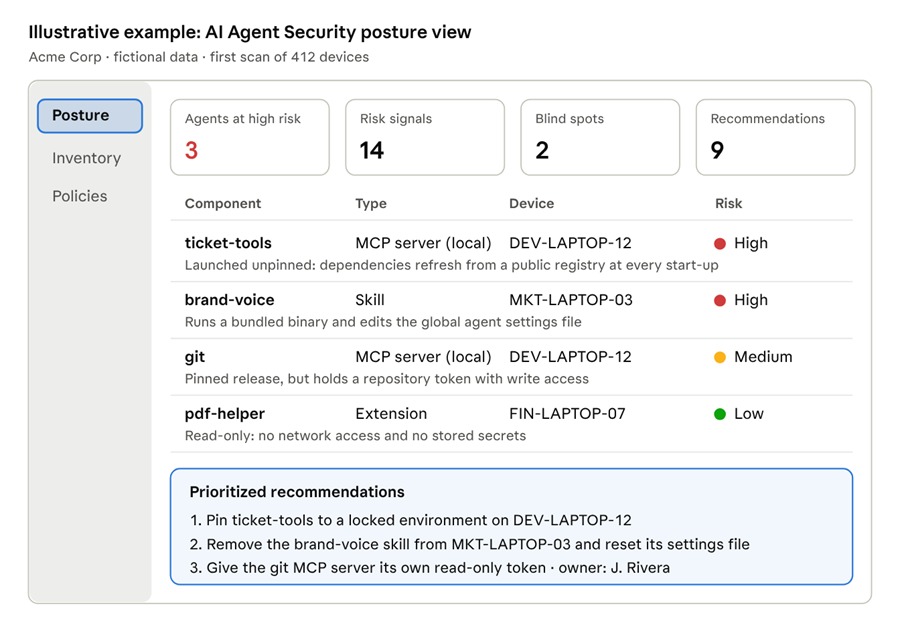
Illustrative example · fictional company, devices and people
Illustrative example. After a first scan at a fictional company, the posture view ranks agent add-ons by risk and explains why, so the team knows which two to fix today.
Keep data safe if an add-on turns bad. Data Shield classifies data on the device across 80+ categories, including PII, PHI, payment data, IP and source code, and allows, warns or blocks in the same instant an agent or person touches it, before it leaves the endpoint. Each decision uses six context signals: device posture, OS activity, process activity, data classification, user activity and network activity. When agent activity and sensitive data combine suspiciously, Kitecyber generates an incident report in minutes, with no prior knowledge of the agent required. The endpoint web gateway also monitors Gen AI and agentic traffic that slips past URL filters, and policies keep working offline.
What day one looks like. Deployment takes about a day, with zero-touch rollout and pre-built compliance policies, and the agent uses under 2% CPU. By the end of the first day you have a list of every AI agent and add-on in the company. Sort the posture view by High risk, pin or remove the worst add-ons, and assign owners to the rest. Then switch on Data Shield in warn mode for source code, customer data and regulated data going to AI tools, and tighten to block once the false positives are tuned out.
SME decision-maker checklist
Use these as quick wins this week, or as questions for any vendor you evaluate.
- 1.Can we list every MCP server, skill, extension and hook on every laptop today? If the answer is a spreadsheet or a survey, it's already out of date.
- 2.Do we see versions and known vulnerabilities for each AI agent and add-on? Ask how fast a new CVE or a hijacked release shows up as an alert.
- 3.Which add-ons run third-party code, hold secrets, or act without approval?Ask for a capability view, not just a name list.
- 4.Are our approved add-ons pinned and locked? Pick your five most-used MCP servers and check how they're launched.
- 5.Do MCP servers use their own least-privilege tokens?Rotate any admin or personal credentials that an add-on currently holds.
- 6.If one add-on is poisoned, what stops it from sending our data out? Ask whether data protection works on the device, offline, and for processes an agent launches.
- 7.Will the tool run on our team's time budget? Ask how long deployment takes and how many people it needs to operate.
Compliance angle
Agent add-ons are third-party software, so existing controls already apply. Auditors are starting to ask about them.
- SOC 2: change management and vendor risk criteria expect you to know what software runs in your environment and to control changes to it.
- ISO 27001:2022: controls on installing software on operational systems and on ICT supply chain security cover skills, plugins and MCP servers.
- CMMC and NIST SP 800-171:configuration management requirements include controlling and monitoring user-installed software.
- HIPAA and PCI DSS: an add-on that can read PHI or cardholder data is in scope for your risk analysis and access controls.
- GDPR: an agent add-on that sends personal data to an unknown server can be a reportable personal data breach.
- EU AI Act: deployers of AI systems are expected to use them as intended and keep oversight. An unreviewed add-on chain makes that hard to show.
An up-to-date inventory of agents and add-ons, with risk ratings and recorded decisions, doubles as audit evidence.
Key takeaways
- AI agents load third-party skills, plugins and MCP servers that update silently and run with your users' keys. That's a supply chain, and attackers are already working it.
- App-level inventories and network-only tools miss this layer. Visibility has to come from the device, down to the add-on and its version.
- Rank add-ons by what they can do, pin what you approve, and protect sensitive data at the point of contact so the one you missed can't take it with it.
See it on your own endpoints. Schedule a walkthrough at kitecyber.com to see what your AI agents have installed and which add-ons to fix first.

Ajay Gulati
Ajay Gulati is a passionate entrepreneur focused on bringing innovative products to market that solve real-world problems with high impact. He is highly skilled in building and leading effective software development teams, driving success through strong leadership and technical expertise. With deep knowledge across multiple domains, including virtualization, networking, storage, cloud environments, and on-premises systems, he excels in product development and troubleshooting. His experience spans global development environments, working across multiple geographies. As the co-founder of Kitecyber, he is dedicated to advancing AI-driven security solutions.