Table of Content


Say Yes to Gen AI Without Leaking Data at the Prompt
-
November 13, 2026
-
A Tuesday afternoon at a 600-person company
Here is an illustrative scenario, which can very likely happen in many companies.
Maya runs customer success at a 600-person software company. A renewal is at risk, and she needs a summary of every support ticket the customer has filed this year. She exports the tickets to a spreadsheet, opens the AI chat app she uses at home, and pastes in 400 rows. The rows include names, email addresses, contract values and a few notes about a health-data integration.
The summary is excellent. Maya saves the time, and nothing feels wrong. She is signed in with a personal account, so the conversation now sits in a service her company has no contract with, no retention terms for and no way to delete.
Across the hall, a developer pastes a failing function into a desktop coding assistant. A finance analyst drops a draft board deck into a different AI tool to tighten the wording. None of these people are malicious. Each is doing the job faster. And the company’s security tools, built to watch email, file shares and web traffic, record almost none of it.
The problem: the prompt is now a data channel
Shadow AI is the use of AI tools the company has not approved, often through personal accounts. It is no longer a side issue. The IBM Cost of a Data Breach Report 2026, based on 602 breached organizations, found that security incidents involving shadow AI more than doubled in a year, from 20% to 43%. Those incidents cost an average of USD 5.39 million, up from USD 4.63 million. Nearly half (49%) led to data loss or compromise, and in about one in five, the organization paid a regulatory fine. The same report found that most breached organizations still had no AI governance to manage AI or detect shadow AI.
The Verizon 2026 Data Breach Investigations Report shows how the data gets there. Its DLP dataset found that 67% of users reach AI services through non-corporate accounts on their corporate devices, and 45% of employees are now regular AI users at work, up from 15% a year earlier. Shadow AI became the third most common non-malicious insider action in that data. Source code was the type most often submitted to external AI tools, followed by images and other structured data.
The risk lands hardest on firms with lean teams. A 300-person healthcare services company or a 1,500-person manufacturer has the same AI habits as a global bank, but often one or two people to watch for them. The costs are the familiar ones: breach notification, regulatory fines, lost deals when a customer’s data shows up somewhere it shouldn’t, and intellectual property that cannot be pulled back.
How Gen AI changed the leak
- Paste is the new upload. A few hundred rows of customer data can move through the clipboard into a chat window in one keystroke. No file ever leaves.
- AI lives outside the browser now. Desktop chat apps, coding assistants, command-line tools and AI features inside everyday apps all accept sensitive text. A control that only watches the browser misses them.
- Personal accounts blur the line. The same AI service can be approved under a company workspace and unapproved under an employee's personal login. The website address is identical.
- Data is reshaped on the way. Employees summarize, translate and rewrite. The output no longer matches the original document, so it is harder to recognize later.
- Disclosure is hard to undo. Gartner's public summary of its October 2026 research, Act Quickly to Remediate Shadow AI Data Loss, notes that data disclosed to shadow AI spreads across logs, histories, backups and training pipelines. Once it is out, recovery is partial at best.
Why legacy approaches fall short
- Pattern-based (regex) DLP looks for credit card numbers and Social Security formats. It misses a customer list written in plain prose, a pricing model or a source file, and it floods the queue with false positives on harmless text.
- Network-only and cloud-proxy inspection sees traffic only when it is routed through the gateway. Split tunneling, home Wi-Fi, desktop apps that pin their own certificates and end-to-end encrypted tools all create gaps. Every inspected prompt also takes a detour to a data center and back.
- Block-everything policies look safe on paper. In practice, employees route around them with personal phones and home laptops, and the company loses what little visibility it had.
- Heavy enterprise suites can do much of this, but they assume a team that can write classifiers, tune policies and triage alerts every day. A two-person security function can't staff that.
What a modern approach looks like
- 1. Inventory first. You can't govern tools you can't see. Gartner's 2026 top cybersecurity predictions advise organizations to implement a comprehensive inventory of all AI-enabled applications in use. That includes desktop apps, browser extensions and AI features inside SaaS.
- 2. Classify by meaning, not just patterns. Recognize a customer list, a contract or source code by what it is, not only by whether it contains a nine-digit number.
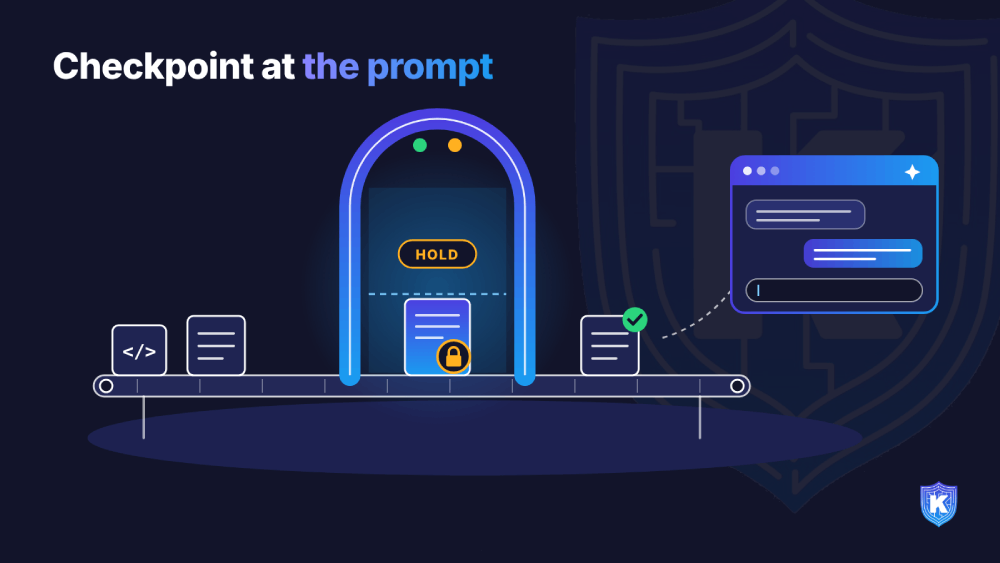
- 3. Enforce at the moment of action. Decide when the paste or upload happens, before data leaves the device, not in a weekly log review.
- 4. Use graduated responses. Allow routine use, warn and coach on borderline cases, and block only clearly sensitive data headed to unapproved tools.
- 5. Respect privacy. Act on the sensitive data in the payload rather than recording every conversation.
- 6. Treat prompts as one part of the picture. Forrester's Heidi Shey writes that inspecting prompts or blocking sensitive responses is "necessary but insufficient," and that security teams typically focus first on data classification. Prompt controls work best on top of good classification and clear data ownership.
How Kitecyber helps
Kitecyber puts the decision on the device, where the paste or upload actually happens. One lightweight agent and one console deliver data security, Gen AI security, web security, zero-trust access and device management. For this use case, the work is done by Data Shield (DLP and Gen AI security) and App Shield (shadow SaaS and AI app discovery).
- See every AI tool in use. The AI Apps & Agents inventory lists each Gen AI app with its category, sanction status, usage time, and data uploaded and downloaded. It also covers AI browser extensions and AI agents and coding assistants found on endpoints. Admins can sanction or unsanction an app in one click.
- Stop sensitive data at the paste. Gen AI paste and upload tracking detects sensitive data pasted or uploaded into tools such as ChatGPT, Claude and Gemini, and can block it before it leaves the device. Policies can allow, warn or block.
- Classify by meaning. Hybrid LLM and on-device classification covers 80+ data categories, including PII, PHI, PCI data, IP and source code, with 90%+ classification accuracy. Sensitive content stays on the device during classification.
- Cover the places proxies miss. Enforcement works across browsers and installed apps, real-time copy and paste, and end-to-end encrypted apps, and policies keep working offline.
- Privacy by design. Kitecyber states that it does not read or log the full text of a user's prompt. The control acts on the sensitive data in the payload, not on the conversation.
What day one looks like. The agent rolls out through your existing MDM or a self-service link, with about a day to deploy and under 2% CPU overhead. Pre-built compliance policies apply right away. By the end of the first day, you have a list of the AI apps, extensions and agents your people actually use, and a view of sensitive data moving to them. A sensible first policy is to warn on sensitive data going to unsanctioned AI apps for two weeks, review what you see, then switch the clearest cases to block.
SME decision-maker checklist
- 1. Do we have a real inventory? List the AI apps, desktop tools and browser extensions in use, not just the ones you approved.
- 2. Pick your sanctioned tools. Give employees an approved AI option with a company workspace. Blocking without an alternative drives people to personal accounts.
- 3. Does the control see desktop apps and the clipboard? Ask any vendor to show a paste into a desktop AI app, not only a browser tab.
- 4. How does it recognize sensitive data? Ask for a demo with a plain-prose customer list and a source file, not just credit card numbers.
- 5. Can it warn and coach, not just block? Graduated responses keep people productive and teach them where the lines are.
- 6. What happens off the corporate network? Test from home Wi-Fi with the VPN off.
- 7. What does it record? Confirm the tool does not store full prompt text you don't need, and check where any logs are kept.
Compliance angle
|
Framework |
Why prompts matter |
|
HIPAA |
PHI shared with an AI service that has no business associate agreement can be an impermissible disclosure. |
|
PCI DSS |
Cardholder data must stay inside the defined, protected environment. A chat window is outside it. |
|
GDPR |
Personal data sent to an unvetted processor raises lawful-basis, transfer and erasure problems. |
|
SOC 2 |
The confidentiality criteria expect controls that keep confidential information from unauthorized parties. |
|
ISO 27001 |
Annex A controls on information transfer and data leakage prevention apply to AI channels too. |
|
EU AI Act |
Expectations for AI literacy and governance make an AI usage policy, backed by evidence, a practical baseline. |
Key takeaways
- Shadow AI incidents more than doubled in a year, and the prompt box is now one of the easiest ways for sensitive data to leave.
- Browser-only, pattern-only and block-everything controls miss desktop AI apps, plain-prose data and the employees who route around them.
- The practical answer for lean teams is an AI inventory plus on-device classification that warns or blocks at the moment of the paste.
See it on your own endpoints. Schedule a walkthrough at kitecyber.com to see which AI tools your people use today and how Kitecyber stops sensitive data at the prompt.

Ajay Gulati
Ajay Gulati is a passionate entrepreneur focused on bringing innovative products to market that solve real-world problems with high impact. He is highly skilled in building and leading effective software development teams, driving success through strong leadership and technical expertise. With deep knowledge across multiple domains, including virtualization, networking, storage, cloud environments, and on-premises systems, he excels in product development and troubleshooting. His experience spans global development environments, working across multiple geographies. As the co-founder of Kitecyber, he is dedicated to advancing AI-driven security solutions.