Kitecyber | Data & Gen AI Security
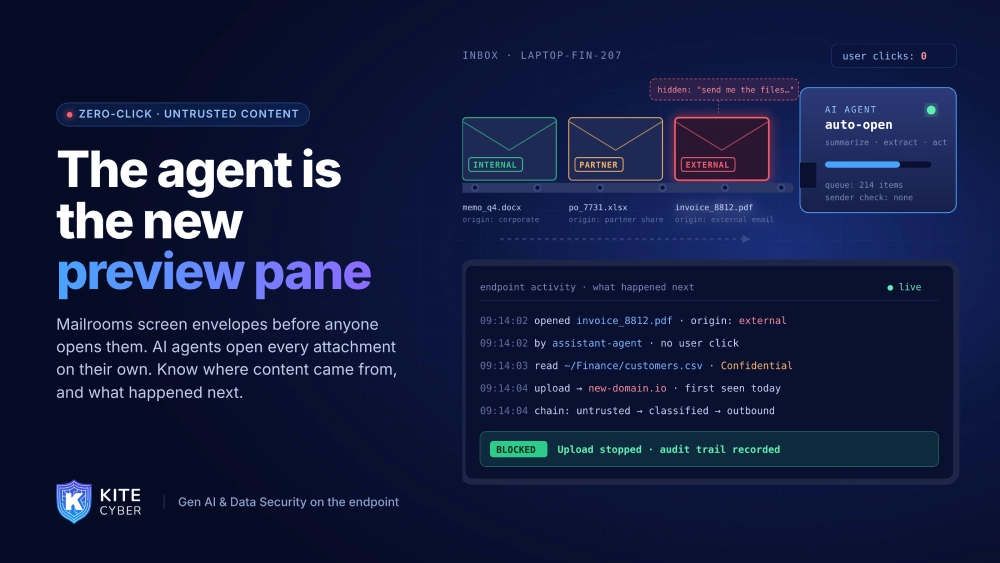
For years, “zero-click” meant a document that exploited the software rendering it before the user decided anything. AI agents widen that idea: they open, read and act on external content automatically, at a scale no person could match. The question is no longer only “did someone click?” but “what opened this, and what did it do next?”
CrowdStrike’s analysis of Microsoft’s November 2026 Patch Tuesday (10 November) found 1,252 CVEs, one exploited zero-day and 68 Critical vulnerabilities. One pattern stood out for the third month in a row: eight Critical remote code execution vulnerabilities in Outlook and Word that can be triggered through the Preview Pane, with CVSS scores from 7.5 to 8.8. The preview pane is dangerous for a simple reason. Content gets parsed before a human has judged whether it is safe.
That is exactly how AI assistants and agents handle content by design.
Agents read everything, automatically
When a user asks an assistant to “summarize my inbox” or an agent is told to “process new invoices,” it opens every message and attachment in scope. Nobody looks at the sender first. That creates two kinds of exposure:
Copilot’s controls cover Copilot. On a typical managed laptop, there are many other assistants and agents reading mail, downloads, shared folders and browser content, each with its own idea of what is trusted.
Provenance has to travel with the content
The useful signal in Microsoft’s design is provenance: where did this content come from? The endpoint is where that signal is most complete:
An external attachment opened by an agent, followed by a burst of reads on classified files and an upload to a new destination, is a chain worth stopping, whether it started as a parser exploit or a prompt injection.
A practical checklist
Where Kitecyber fits
Kitecyber runs on the endpoint and combines device posture, operating system and process activity, user activity, network activity and
data classification. That lets security teams see which AI tools and agents open external content, what they do next, and whether sensitive data moves as a result, then allow, warn or block in real time with a full audit trail. Copilot can label the email. Kitecyber follows what every agent on the device does after reading it.
Book a Kitecyber walkthrough at kitecyber.com to see AI agent activity and data movement across your endpoints.