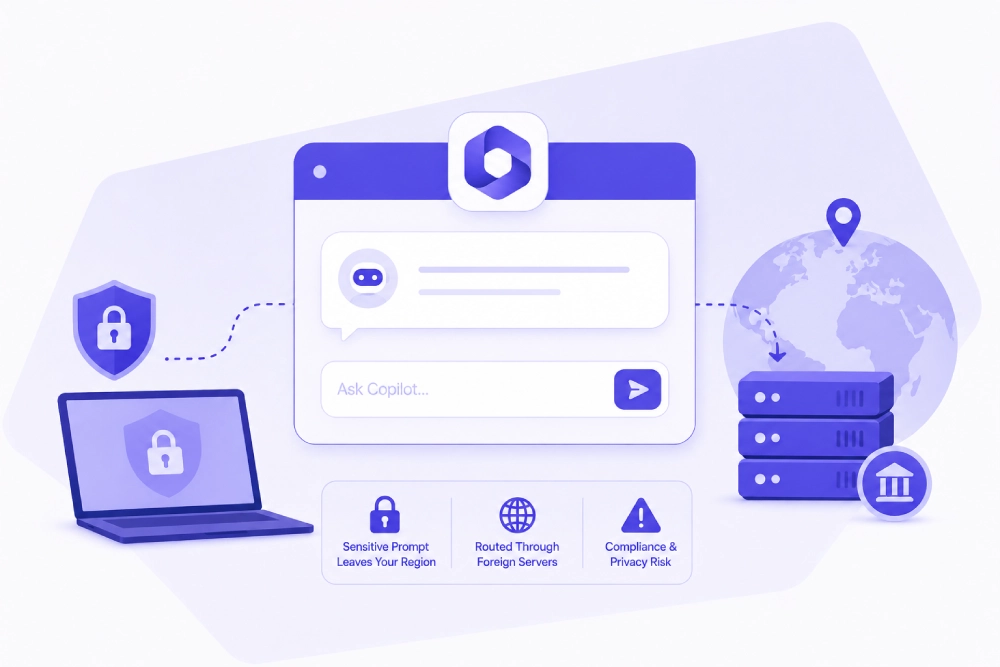
When an employee types a customer contract clause or a piece of proprietary source code into Microsoft Copilot, that prompt does not necessarily stay in the country where the employee is sitting. Microsoft Copilot for Microsoft 365 complies with the EU Data Boundary, keeping European customer data stored and processed within the EU, and in the US and UK, Copilot data residency follows the tenant’s existing Microsoft 365 data location settings. But under load, Microsoft can apply flex routing, sending prompts to data centers outside the tenant’s default region unless the organization has purchased the Advanced Data Residency add-on to lock processing to a specified geographic boundary. That single architectural detail is the center of the copilot data residency question, and it is why endpoint-level visibility into what leaves a device, before it ever reaches a Microsoft data center, has become a practical requirement rather than a nice-to-have.
TL;DR
About the Author: This article was produced by Kitecyber, a data-security company built around endpoint and network DLP for the AI agent era, whose platform is used by AI-native and technology companies including DuploCloud, Lily AI, Sarvam, and Scrut Automation to control exactly what sensitive data reaches GenAI tools like Copilot.
What Does Copilot Data Residency Actually Mean?
Copilot data residency refers to the geographic location where Microsoft processes and stores the prompts, responses, and grounding data generated when an employee interacts with Microsoft 365 Copilot. It is not a single fixed guarantee; it is a routing behavior. By default, Microsoft directs Copilot prompts to the data center closest to the tenant’s region, but reserves the right to use flex routing to other regions when regional capacity is constrained. For a tenant in Frankfurt, this could mean a prompt containing merger details is processed in a different jurisdiction than the one the company assumed when it signed its data processing agreement.
This matters because data residency is not just a legal formality. Regulations in finance, healthcare, and government contracting frequently require that certain categories of data never leave a defined jurisdiction, regardless of how convenient it would be for a cloud vendor’s load balancer to route around it. Organizations that need a hard guarantee, rather than a default-with-exceptions, need to explicitly purchase the Advanced Data Residency add-on. Absent that add-on, “data residency” is best understood as “usual processing location under normal conditions,” not a contractual boundary.
Why Do AI Copilots Change the Data Residency Calculation?
Traditional SaaS data residency is comparatively simple: a customer record sits in a database in a defined region, and access logs show who queried it. Copilot and similar AI assistants complicate this because the same data can appear across multiple layers, prompts, grounding data pulled from SharePoint or email, and generated responses, each potentially processed and cached differently. A CISO evaluating Copilot has to ask not just “where is our data stored” but “where does each stage of the AI pipeline process the data on its way to an answer.”
This is the mechanism behind most Microsoft Copilot security risks that security teams raise because Copilot does exactly what it was built to do, surface relevant information, without perfect awareness of permission boundaries. If permissions on a SharePoint folder are overly broad or misconfigured, Copilot can surface content to a user who technically has access but was never intended to see it. The AI assistant is not violating a rule; it is enforcing the rules exactly as configured, and the configuration is the actual vulnerability. This is precisely why an ai governance framework has to extend past legal boundary agreements and into permission hygiene, prompt-level controls, and continuous monitoring of what is typed into these tools, not just where the resulting data lands.
What Are the Real Data Residency Requirements Organizations Face?
Data residency requirements come from a mix of contractual, regulatory, and internal policy sources, and they rarely map cleanly onto how AI assistants actually move data. A useful way to organize the landscape:
Requirement source | What it typically demands | Gap with default Copilot routing |
|---|
EU data protection rules | Personal data of EU residents processed within EU boundary | Covered by the EU Data Boundary for Copilot, but flex routing exceptions still apply outside strict guarantees. |
Government/defense contracts | Data isolated to sovereign or GCC High environments | Requires specific Copilot deployment tiers with tailored identity and residency controls. |
Industry compliance (HIPAA, FINRA, PCI DSS) | Data protection and access controls, not always explicit AI routing rules | Existing frameworks like NIST, ISO 27001, and SOC 2 predate generative AI and must be mapped onto AI use cases manually |
Internal corporate policy | No sensitive IP or source code leaving approved regions or platforms | Not enforced by cloud-side residency settings at all; requires endpoint-level policy |
The pattern across all four rows is the same: cloud-side residency settings answer “where does approved data get stored,” but none of them answer “what stops an employee from pasting unapproved data into the prompt box in the first place.” That is a distinct control problem, and it sits at the endpoint, not in Microsoft’s data center configuration.
How Big Is the Shadow AI Risk Inside Organizations Today?
Shadow AI risk is the exposure created when employees use AI tools, sanctioned or not, to process sensitive data outside of IT’s visibility or approved data flows. The scale is no longer speculative. Menlo Security found that 55% of the DLP events it detected involved attempts to input personally identifiable information into generative AI tools. Zscaler separately reported a 99% year-over-year increase in ChatGPT-related DLP violations involving sensitive data such as source code and financial records, and a 2025 survey found that 57% of enterprise employees had submitted sensitive company data into public AI platforms.
Read together, these numbers describe a consistent behavior pattern, not an edge case. Employees treat AI copilots the way they treat search engines or spreadsheets: a general-purpose tool for getting work done faster, without pausing to classify whether the pasted content is a public FAQ or a customer’s protected health information. Copilot data privacy depends heavily on that pause happening, and human habit is not a reliable control. This is the core argument for endpoint-native prevention: a policy document telling employees not to paste sensitive data into AI tools is advisory, but a control that inspects the clipboard or the prompt field in real time and blocks the paste is enforcement.
What Are the Real AI Agent Security Risks Beyond a Single Copilot Prompt?
Building on the prompt-level risk above, a harder problem emerges once AI moves from answering questions to acting autonomously. Agentic workflows, where an AI agent reads a file, summarizes it, and pushes the summary into another SaaS tool without a human reviewing each step, multiply the number of places sensitive data can leave its intended boundary. A single Copilot prompt is one data point in time; an autonomous agent chaining multiple actions together can move data through several systems in seconds, faster than a compliance officer can review an access log.
Competing endpoint DLP and AI security tools have converged on a similar answer: real-time interception and inspection of prompts before they leave the device, combined with context-aware policy enforcement, data lineage tracking, and audit logging to support residency and privacy compliance. That convergence is a useful signal. It confirms that the industry agrees the point of control needs to move earlier, to the moment content is typed or an agent initiates an action, rather than staying at the network perimeter or the cloud application layer.
How Should Organizations Actually Control Copilot and AI Data Flows?
This is where Kitecyber’s approach is built specifically around the mechanism described above. Rather than trying to govern AI risk exclusively through cloud tenant settings or after-the-fact audit logs, Kitecyber operates on a See, Decide, Enforce model, continuously, directly at the endpoint where the prompt is typed:
This is consolidation over fragmentation in practice. Instead of a network DLP tool, a separate CASB for SaaS uploads, and a third product for browser-based GenAI monitoring, one lightweight agent handles data classification, GenAI prompt inspection, and SaaS data movement together, closing the blind spots that appear when point solutions do not share context. For a security team that has spent a year watching shadow GenAI usage climb, that consolidated visibility is the difference between reactive incident response and prevention at the source.
About Kitecyber
Kitecyber is a data-security company headquartered in the Bay Area that protects sensitive information at the endpoint, where GenAI prompts, SaaS uploads, and AI agent actions actually happen. Its platform combines endpoint and network DLP, GenAI and AI agent security, Secure Web Gateway, SaaS protection, ZTNA, and unified endpoint management into one lightweight agent, replacing fragmented point-solution stacks with a single source of visibility and enforcement. Kitecyber is used by AI-native and technology companies, including DuploCloud, Lily AI, Sarvam, and Scrut Automation, to support compliance work spanning HIPAA, GDPR, CMMC, ISO 27001, SOC 2, DPDP, FINRA, and PCI DSS. The company’s operating model, See, Decide, Enforce, continuously, is designed specifically for a threat model where AI copilots and autonomous agents move data faster than manual review can catch.
Data residency settings and compliance certifications describe where your data is supposed to end up. They do not control what an employee types into a prompt before submission.
References
Frequently Asked Questions