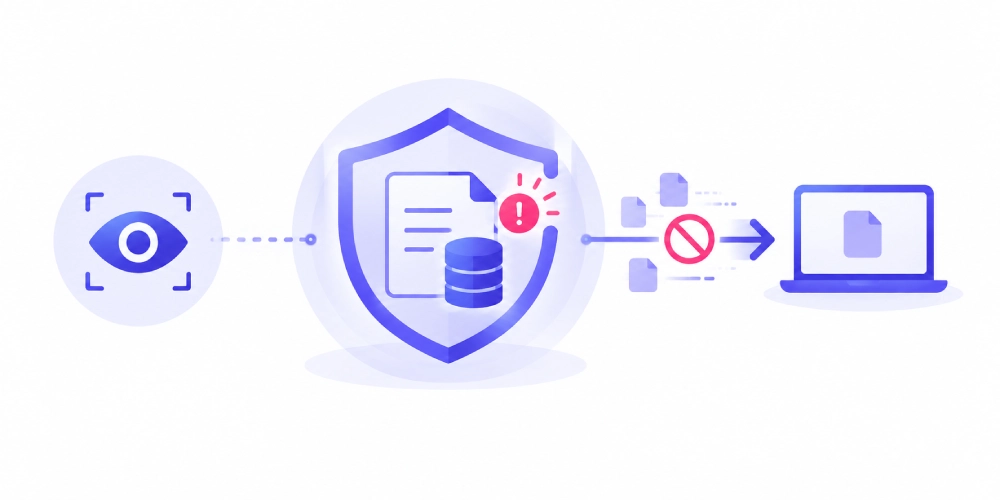
A finance employee at a mid-size firm pastes a client’s account details into a chatbot to “clean up the formatting.” Nothing gets flagged. No policy fires. The employee is authorized to access that file, on a managed laptop, during work hours. Every box on a traditional checklist gets checked, and the data still leaves the building.
Data detection and response (DDR) exists because scenarios like this happen every day, and most legacy tools are built to miss them. Gartner projects that automated security tools, DDR included, will handle roughly half of all security alerts going forward, a sign of how fast this category has moved from niche to necessary. IBM defines DDR as a technology built specifically to track data movement and activity across on-premises, cloud, and multicloud environments, rather than watching the network perimeter the way older tools do.
This guide breaks down what DDR actually is, how it works underneath the marketing language, and what DDR is used for in a real security stack. Then we will walk through how Kitecyber built its own detection and response layer directly into its unified DLP platform, so you can see the difference between reading about DDR and watching it work.
What Is Data Detection and Response (DDR)?
Data detection and response is a security category that emerged around 2022 and 2023, once organizations noticed that data now moves faster and further than any perimeter can reasonably guard. Rubrik describes DDR as a solution built to detect data-related security threats in real time, so teams can respond, protect the compromised data, and remediate the incident before it turns into a headline.
The core idea is simple even though the engineering behind it is not. Instead of asking “did something suspicious cross my network,” DDR asks “what is happening to this specific piece of sensitive data, right now, no matter where it lives.” That shift in framing is what separates DDR from most of the security tooling built in the last two decades.
How Is DDR Different From Traditional DLP?
Classic DLP was designed for a world of office networks and file servers. It watches defined checkpoints, like a network gateway or a managed device, and blocks activity that breaks a written rule. That model works well for predictable channels. It works far less well once your data lives across a dozen SaaS apps, personal devices, and GenAI tools that never touch your corporate network at all.
DDR follows the data instead of the checkpoint. It tracks lineage, meaning where a piece of sensitive data originated and everywhere it has traveled since, and it builds a behavioral baseline for who normally touches that data and how. When access or movement breaks that pattern, even through a fully authorized account, DDR flags it. This is exactly the kind of gap that matters for supply chain attacks and insider threats, where the person or system doing the damage already has legitimate credentials.
Traditional DLP asks: did this action break a written policy at a known checkpoint?
DDR asks: does this specific interaction with this specific sensitive data match how it normally gets used?
What Are the Four Components of a DDR Solution?
Most DDR platforms, regardless of vendor, are built around the same four building blocks.
Discovery and classification
The platform scans cloud storage, databases, SaaS applications, and endpoints to build a live inventory of sensitive data, then classifies it by type such as PII, PHI, financial records, or intellectual property.
Behavioral baselining
DDR establishes what normal looks like for each data asset. Who accesses it. From where. How often. Through which application. This baseline becomes the yardstick every future interaction gets measured against.
Continuous monitoring
Every interaction with sensitive data gets tracked in real time, whether that data is at rest in a repository or in motion between systems, devices, and users.
Automated response
When monitoring detects something that breaks the baseline, such as unusual data access from an unfamiliar location, the platform contains it immediately instead of waiting for a human analyst to review an alert queue.
What Data Threats Does DDR Actually Catch?
DDR earns its place in a security stack by catching activity that other tools were never built to see. That includes an authorized employee accessing far more files than their role requires, sensitive data suddenly moving from a secure environment into an unsecured one, a compromised but legitimate account exfiltrating data slowly to avoid tripping volume-based alerts, and regulated data getting pasted into a public GenAI tool without oversight.
Each of these examples shares a common thread. The access itself was technically permitted. The behavior around that access was not normal. That distinction is the entire reason DDR exists as its own category instead of just being a feature bolted onto DLP.
What Does Kitecyber DDR Look Like in Practice?
Kitecyber built its detection and response capability directly into its endpoint-first data security platform, rather than treating DDR as a separate bolt-on tool. Here is how each piece works.
Contextual classification, not just pattern matching
Kitecyber automatically discovers and classifies sensitive data across endpoints, SaaS, email, network traffic, and GenAI tools, drawing from over 80 predefined categories that cover PII, PHI, PCI, intellectual property, and source code. Instead of relying only on regex or OCR, which tend to produce heavy false-positive volume, Kitecyber uses contextual AI to reach over 90 percent classification accuracy.
Continuous detection across every managed device
Kitecyber locates sensitive data across every managed device with continuous monitoring, so risk gets caught early instead of during a quarterly audit.
Real-time response before data leaves
This is the response half of DDR. Kitecyber enforces consistent controls across every channel data can move through, including endpoint actions like USB transfers, copy-paste, and screenshots, email attachments and inline copy-paste, SaaS and GenAI uploads, downloads, and prompts, and network-level website and application blocking.
Audit-ready incident reports in minutes, not weeks
Once Kitecyber detects and contains an incident, it generates daily, weekly, or monthly reports that track users, devices, actions, and impact, giving compliance teams and leadership clear, defensible evidence without weeks of manual forensics.
Because Kitecyber runs detection and response from a single endpoint agent, it also avoids the CPU overhead problem that comes with running separate DDR, DLP, and EDR agents side by side. Kitecyber reports under 2 percent CPU overhead compared to the heavy scans and performance spikes common with legacy, multi-agent stacks.
|
Capability
|
Kitecyber DDR + DLP
|
Traditional DLP / DDR Point Tools
|
|
Data classification accuracy
|
90%+ with contextual AI
|
Lower, regex/OCR dependent
|
|
Incident response time
|
Minutes, 150+ behavior indicators
|
Weeks to months of manual forensics
|
|
GenAI prompt visibility
|
Real-time inspection before data leaves
|
Typically no coverage
|
|
Deployment model
|
Single endpoint agent
|
Agent, appliance, or cloud gateway
|
|
Data lineage tracking
|
Comprehensive, cross-platform audit trails
|
Partial, siloed across tools
|
|
Endpoint performance impact
|
Under 2% CPU overhead
|
Often high during scans
|
How Does DDR Help You Meet Compliance Requirements?
Auditors care about evidence, not intentions. DDR gives you a continuous, timestamped record of how sensitive data moved, who touched it, and what your platform did in response. That record maps directly onto requirements common across GDPR, HIPAA, PCI DSS, SOC 2, and ISO 27001, all of which expect you to show you know where regulated data lives and can prove it stayed protected.
Kitecyber ships with pre-built policy templates aligned to these standards, which is a meaningful part of why customers report roughly 30 percent less time spent preparing for compliance reviews. Instead of assembling evidence manually from five disconnected tools, the audit trail already exists inside one console.
What Are the Signs You Need DDR Right Now?
A handful of situations tend to signal that data detection and response has moved from nice-to-have to necessary.
- Your team has no visibility into what employees paste into ChatGPT, Copilot, or Gemini.
- You could not tell an auditor, with evidence, where your regulated data currently lives.
- Your existing DLP relies on network rules and misses remote or off-network activity entirely.
- A past incident took weeks of manual log review instead of minutes of automated reporting.
- You are running separate DLP, DDR, and endpoint agents that each add their own overhead and blind spots.
If two or more of those sound familiar, it might be time to see what a unified approach looks like instead of stacking another point solution on top of the ones you already have.
Frequently Asked Questions About Data Detection and Response